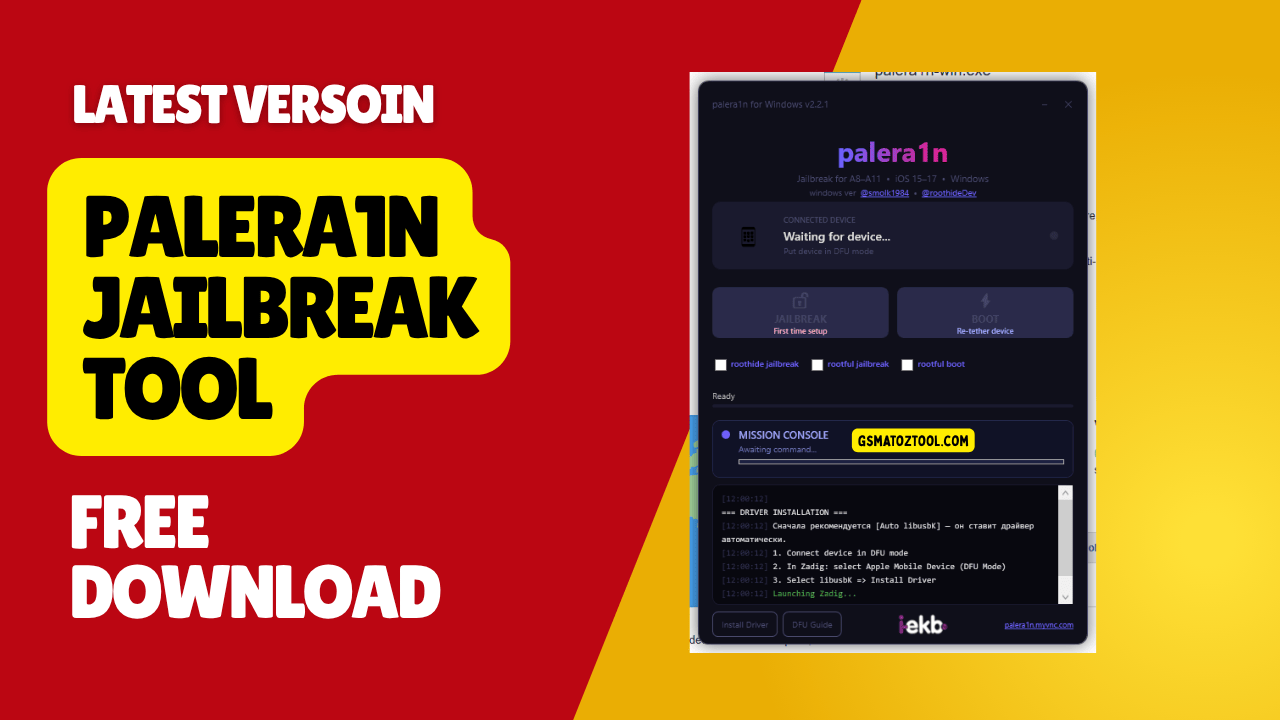
Easy iphone jailbreak with palera1n – supports rootless rootful and roothide modes with built-in troubleshooting tools
Look I Get It—you Want To Jailbreak Your Iphone But Every Tool You’ve Tried Either Crashes Halfway Through Or Throws Some Weird “waiting For Device” Error That Makes Zero Sense. It’s Frustrating When You Just Want A Little More Freedom On Your Own Phone Without Feeling Like You Need A Computer Science Degree. That’s Exactly Why Palera1n Caught My Attention. It Works On Older Devices Like Iphone 6 All The Way Up To Iphone X Supports Ios 15 16 And 17 And Doesn’t Make You Jump Through Hoops Just To Get Started.
What I Really Like About Palera1n Is How Straightforward Everything Is. You Get A Simple “first Time Setup” Button For Fresh Jailbreaks A Quick “Boot” Option When Your Phone Restarts And Honestly The Built-in Tools Are A Lifesaver. There’s A Live Console Showing You What’s Happening A Dfu Guide Right Inside The App And It Even Fixes Driver Issues Automatically With Zadig. Whether You Want Rootless Rootful Or Roothide Mode You’re Covered. Let Me Break Down Why This Might Be The Easiest Jailbreak Experience You’ll Have.
What Is The Palera1n
Palera1n Is A Semi-tethered Jailbreak Tool That Brings Full Customization Power To Your Iphone Without The Usual Headaches. It’s Built Specifically For Devices Running Apple’s A8 Through A11 Chips—that Means Iphone 6 6s 7 8 And Even Iphone X Are Fully Supported Along With Compatible Ipads. What Makes It Stand Out Is Its Wide Ios Compatibility. Whether You’re Still On Ios 15 Recently Updated To Ios 16 Or Even Running Ios 17 This Tool Handles All Three Versions Smoothly. You’re Not Locked Into One Outdated Firmware Just To Jailbreak Anymore.
The Real Flexibility Comes From The Jailbreak Environments It Offers. You Can Choose Between Roothide Rootful Or The Standard Rootless Setup Depending On What You Need. Rootless Keeps System Files Untouched For Safer Tweaking While Rootful Gives Advanced Users Complete Control. Roothide Sits Somewhere In Between Hiding Modifications From Detection. There’s Also A Mission Console Built Right In—it’s Basically A Live Terminal Showing Exactly What The Software Is Doing Step-by-step. No More Guessing If Something Froze Or If It’s Actually Working In The Background.
Download The Palera1n Latest Version
Downloading It Is Straightforward. Go To The Official Site Grab The Version For Windows Mac Or Linux And Unzip It Somewhere You’ll Remember. Open The App And You’ll See “first Time Setup” Right There. Click It Plug In Your Phone And Let It Run. That’s Genuinely It For A Fresh Jailbreak. If Your Battery Dies Or You Restart Your Phone Later You’ll Lose The Jailbreak Temporarily—but Instead Of Redoing Everything Just Open The App Again And Hit “boot.” Takes Like 30 Seconds And You’re Jailbroken Again. Way Better Than Starting From Scratch Every Time.
The Built-in Tools Actually Help Instead Of Just Existing For Show. The Dfu Guide Walks You Through Putting Your Phone In Dfu Mode Without Leaving The App Which Beats Hunting Down Some Outdated Forum Post. If You Hit The “waiting For Device” Error—which Happens A Lot With Jailbreaks—there’s An “install Driver” Button That Opens Zadig For You. Turn On “list All Devices” Find Your Phone And Install The Libusbk Driver. One Click Fixes It. No Manually Hunting For Driver Files Or Messing With Device Manager. That Kind Of Automation Is Rare And Honestly Makes The Whole Experience Less Frustrating.
Features:
- Wide Device Support: Works Perfectly With Apple A8 To A11 Devices (Iphone 6 To Iphone X And Supported Ipads).
- Latest Ios Compatibility: Fully Supports Ios 15 Ios 16 And Ios 17.
- Multiple Jailbreak Environments: Gives You The Freedom To Choose Between Roothide Rootful Or Standard Rootless Jailbreaks Based On Your Needs.
- 1-click Jailbreak: Dedicated “First Time Setup” Button To Easily Jailbreak A Fresh Device.
- Easy Re-tethering: A Quick “Boot” Option To Seamlessly Re-tether Your Device If It Reboots Or Loses Power.
- Built-in System Tools & Interface
- Mission Console: A Live Built-in Terminal That Shows Step-by-step Logs Commands And Exactly What The Software Is Doing In The Background.
- Dfu Guide: Built-in Instructions To Help You Easily Put Your Iphone Into Dfu Mode Without Leaving The App.
- Integrated Driver Installer (Zadig): Fixes The Annoying “waiting For Device” Issue Directly. Clicking “install Driver” Opens Zadig Automatically.
- Smart Driver Patching: Uses Zadig To Easily Detect Your Phone In Dfu Mode (“list All Devices”) And Lets You Install The Required Libusbk Driver With A Single Click.
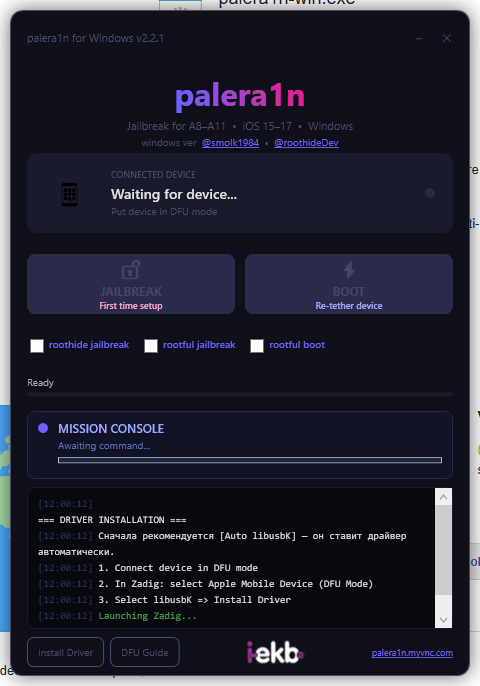
Palera1n jailbreak interface with roothide rootful and rootful boot options mission console and built-in dfu guide for ios 15-17
Palera1n Jailbreak For Ios 16 And Ios 17
The Palera1n Jailbreak Stands Out Because It Covers Both Ios 16 And Ios 17 Which Most Older Tools Don’t Support Yet. If You’re On Ios 16.7.10 Specifically You’re In Luck—palera1n Handles That Version Without Issues. Ios 17 Support Is Still Being Refined But Stable Builds Are Available For A11 And Older Devices. This Means You Can Update To Newer Ios Versions For Security Patches While Keeping Your Jailbreak Active. That’s A Rare Combination In The Jailbreak Scene Right Now.)
Some People Ask About Palera1n Ios 18 Compatibility. As Of Now Ios 18 Isn’t Officially Supported Since It Requires Different Exploit Chains And Apple Patched Some Vulnerabilities. The Dev Team Updates Palera1n Regularly On Github So Keep An Eye On The Official Palera1n Github Page For Announcements. If Ios 18 Support Drops That’s Where You’ll See It First. For Now Stick With Ios 15 Through Ios 17 If You Want A Stable Jailbreak Experience Without Constant Crashes Or Reboots.
Fixing Palera1n Unable To Fetch Bootstraps Error
The Palera1n Unable To Fetch Bootstraps Error Is Frustrating But Usually Fixable. It Happens When The Tool Can’t Download Or Install The Necessary Files To Set Up Cydia And The Jailbreak Environment. Most Of The Time It’s A Network Issue—your Firewall Or Antivirus Might BeBlocking The Download. Try Disabling Them Temporarily And Running Palera1n Again. Some Users Also Report Dns Issues So Switching To Google Dns (8.8.8.8) Or Cloudflare (1.1.1.1) Sometimes Helps Clear It Up.
If That Doesn’t Work Check The Palera1n Unable To Fetch Bootstraps Github Page For Known Issues And Solutions. Sometimes The Bootstrap Servers Are Down Or Overloaded Especially Right After A New Release When Everyone’s Trying To Jailbreak At Once. The Devs Usually Post Workarounds Or Mirror Links In The Issues Section. Another Fix: Make Sure You’re Using The Latest Palera1n Version—older Builds Might Point To Outdated Or Broken Bootstrap Urls. Updating To The Newest Release From Github Often Solves It Automatically.
Palera1n For Mac And Macos Universal Support
Running Palera1n For Mac Is Honestly The Smoothest Experience. Macos Has Better Compatibility With Ios Devices Out Of The Box So You Skip A Lot Of Driver Headaches Windows Users Deal With. Download The Palera1n Macos Universal Build From Github—it Works On Both Intel And Apple Silicon Macs. Just Extract The File Open Terminal Navigate To The Folder And Run The Palera1n Executable With The Appropriate Flags. The Official Github Readme Has Exact Commands But It’s Usually Something Like ./palera1n -c For A Fresh Jailbreak.
Mac Users Also Get Faster Usb Communication With Iphones Which Means Shorter Wait Times During The Jailbreak Process. If You’re On An M1 Or M2 Mac Make Sure You’re Using The Arm Version Of Palera1n—the X86 Build Won’t Run Natively And Might Cause Issues. The Palera1n Macos Universal Binary Handles This Automatically So Just Grab That One If You’re Not Sure. Once It’s Done Your Phone Will Reboot And Cydia Should Appear. Simple Clean And Way Less Troubleshooting Than Windows Builds Require.
Hide Jailbreak Detection With Palera1n
Banking Apps Games And Streaming Services Love To Detect Jailbreaks And Block Access. If You Want To Hide Jailbreak Palera1n From These Apps You’ll Need Tweak-based Solutions. Popular Options Include A-bypass Shadow Or Hestia—all Available Through Cydia Once You’re Jailbroken. These Tools Mask Jailbreak Files And Hooks So Apps Can’t Detect Modifications. Some Work Better Than Others Depending On The App So You Might Need To Test A Few Before Finding One That Works For Your Specific Use Case.)
Roothide Mode In Palera1n Also Helps With Detection Since It Keeps Modifications Hidden From The System Partition. If You’re Planning To Use Apps With Strict Jailbreak Checks Choose Roothide During Setup Instead Of Rootful Or Rootless. It Won’t Guarantee 100% Invisibility—some Apps Use Hardware-level Checks Or Server-side Validation—but It’s A Solid First Layer Of Defense. Combine It With A Good Tweak And You’ll Bypass Most Jailbreak Detection Without Issues. Just Update Your Tweaks Regularly Since Apps Patch Detection Methods All The Time.
Palera1n For Apple Tv Jailbreak
Yes Palera1n Apple Tv Support Exists But It’s Limited. Currently It Works On Apple Tv 4k (2nd Gen) And Apple Tv Hd Running Tvos 15 Or 16. The Process Is Similar To Jailbreaking An Iphone—you Need A Mac Or Linux Machine A Usb-c Cable And The Palera1n Tool. Put Your Apple Tv Into Dfu Mode Connect It And Run The Jailbreak Command. Once Done You Can Sideload Apps Install Kodi Or Use Tweaks To Remove Restrictions Apple Puts On The Os.
Keep In Mind Apple Tv Jailbreaking Is Way Less Supported Than Iphone Jailbreaking. Tweaks Are Harder To Find And Most Developers Focus On Ios Devices Instead. If Something Breaks You Might Be Stuck Restoring To Stock Tvos. That Said If You Want Deeper Control Over Your Apple Tv—like Changing Dns Settings System-wide Or Blocking Ads At The Os Level—palera1n Is One Of The Few Tools That Can Do It. Just Don’t Expect The Same Polish Or Community Support You’d Get On Ios.
Frequently Asked Questions (FAQs)
How To Use Palera1n?
Download Palera1n For Your Os (windows/mac/linux) Connect Your Iphone Put It In Dfu Mode And Click “first Time Setup.” After Jailbreaking Use The “boot” Option Whenever Your Phone Restarts.
How To Install Palera1n?
Extract The Downloaded Palera1n File Run It As Administrator (windows) Or Via Terminal (mac/linux) And Follow The On-screen Dfu Instructions. Install Drivers Using Zadig If Prompted On Windows.
How To Install Palera1n On Windows?
Download The Windows Version From Github Extract The Zip Run The .exe As Admin Install Zadig Drivers When Needed And Connect Your Iphone In Dfu Mode To Start The Jailbreak.
How To Jailbreak With Palera1n?
Open Palera1n Connect Your Device Enter Dfu Mode Following The Built-in Guide Click “first Time Setup” And Wait For The Process To Complete. Your Phone Will Reboot With Cydia Installed.
How To Remove Palera1n Jailbreak?
Restore Your Iphone Using Itunes Or Finder. This Wipes The Jailbreak Completely. Alternatively Use The “restore System” Option In Some Palera1n Builds Though A Full Itunes Restore Is Safer.
Final Thoughts
Palera1n Works Because It Respects Your Time. Wide Support From Iphone 6 To Iphone X Compatibility With Ios 15 Through 17 And The Freedom To Pick Between Rootless Rootful Or Roothide Depending On What You’re After. The Setup Button Actually Does What It Says The Boot Option Gets You Back In Fast And Tools Like The Mission Console Dfu Guide And Zadig Integration Handle The Annoying Parts For You. If Other Jailbreaks Have Burned You With Crashes Or Confusing Steps Give This One A Shot. It’s Not Perfect But It’s Close Enough.
How To Download
To Download Palera1n Follow These Steps:
- Go To The Gsmatoztool.com Website Of Palera1n.
- Find The Download Page And Don’t Click Button And Click Only The (Download Link)
- Below Buttons Are Advertisements. Please Use The Download Links Above.
- Wait For The Download To Complete.
- Locate The Downloaded File On Your Device Once The Download Is Finished.
- Double-click On The File To Start The Installation Process.
- Follow The On-screen Instructions To Complete The Installation.
Palera1n 2.2.1
Download Link:: Usersdrive – Mediafire – 4shared – My.pcloud – Mega – Vexfile – Google Drive – Drive Proton