

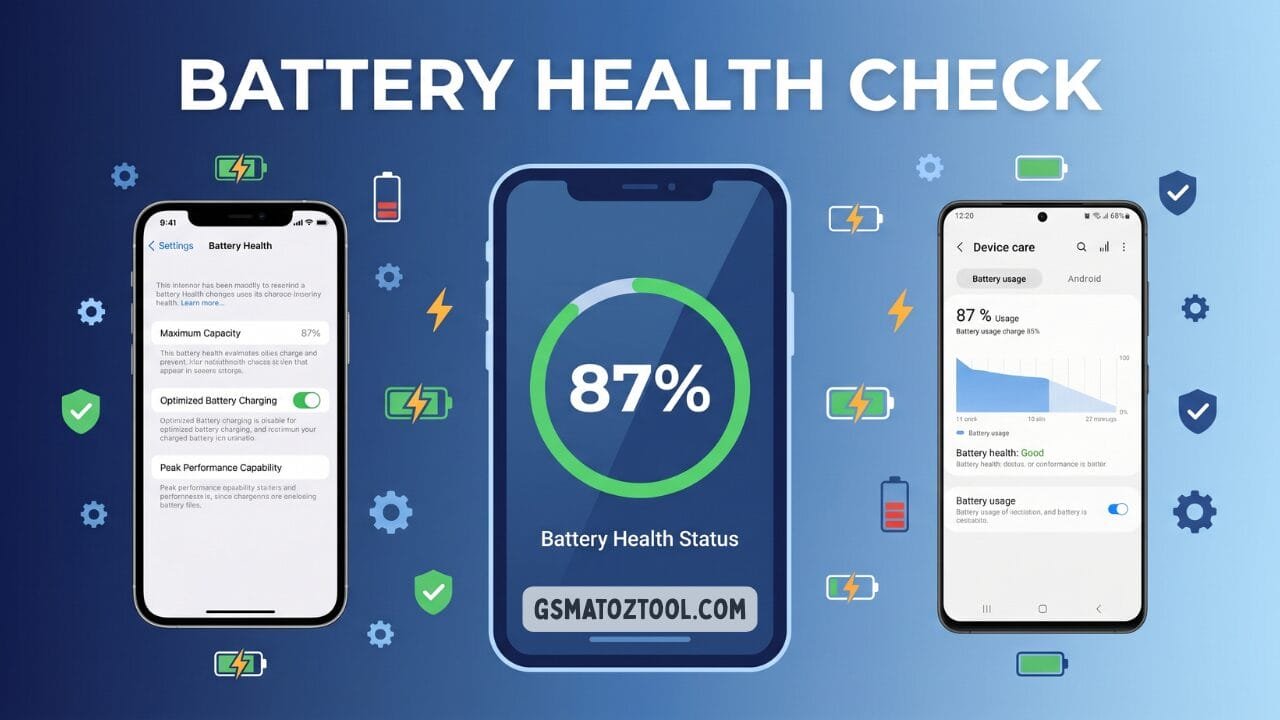
How to check phone battery health a complete guide to checking phone battery health on iphone samsung and all android phones — with step-by-step instructions warning signs and replacement tips.
Your Smartphone Is Only As Good As Its Battery. You Can Have The Latest Flagship Phone With The Fastest Processor And The Sharpest Camera But If Your Battery Is Dying None Of That Matters. A Weak Battery Means Constant Charging Unexpected Shutdowns And A Phone That Slows Itself Down Just To Survive The Day.
So How Do You Know If Your Battery Is The Problem? The Answer Is Simple: You Check Your Phone’s Battery Health. Knowing How To Check Phone Battery Health Takes Less Than A Minute — And Once You Have That Number You Can Make Smart Decisions. Whether That Means Changing Your Charging Habits Replacing The Battery Or Simply Stopping The Worry That One Number Tells You Everything. This Guide Covers It All. You Will Learn What Battery Health Actually Means How To Check It On Iphone Samsung Android And Xiaomi What The Numbers Tell You The Warning Signs Of A Failing Battery And The Best Habits To Keep Your Battery Healthy For Years.
What Is Phone Battery Health?
Battery Health Is A Percentage That Tells You How Much Charge Your Battery Can Hold Compared To When It Was Brand New. Understanding Battery Health Is The First Step In Learning How To Check Phone Battery Health — And Knowing What To Do About It.
When Your Phone Leaves The Factory The Battery Is At 100% Health. It Can Hold Its Full Designed Capacity — Say 4000 Mah On A Samsung Galaxy Or 3279 Mah On An Iphone 15. Over Time As You Charge And Discharge The Battery Repeatedly Its Ability To Hold That Full Charge Slowly Decreases. This Is Called Electrochemical Degradation And It Happens To Every Lithium-ion Battery On The Planet No Matter How Carefully You Treat It.
After About 500 Full Charge Cycles Most Smartphone Batteries Retain Roughly 80% Of Their Original Capacity. Apple Uses 80% As Its Official Service Threshold. Samsung Flags Batteries Below A Certain Cycle Count Or Voltage Stability Level. Either Way Once You Drop Below 80% The Effects Become Noticeable In Daily Use.
What Is A Charge Cycle?
A Charge Cycle Is Not Every Time You Plug In Your Phone. A Full Charge Cycle Equals 100% Of Your Battery’s Total Capacity Used — Regardless Of How Many Sessions It Takes.
For Example: If You Use 50% Of Your Battery On Monday And Charge It Back To 100% Then Use 50% On Tuesday And Charge It Back Again That Counts As One Full Charge Cycle — Not Two. This Means That People Who Top Up Their Phones Frequently Throughout The Day Are Actually Completing Fewer Full Cycles Than People Who Drain Their Phone Completely Before Charging. Fewer Cycles Mean Slower Battery Degradation Over Time.
Why Does Battery Capacity Decrease?
Lithium-ion Batteries Store Energy By Moving Lithium Ions Between Two Electrodes Through A Liquid Electrolyte. Each Charge Cycle Causes Tiny Chemical Changes Inside The Battery. The Electrolyte Breaks Down Slightly. Lithium Ions Get Trapped In Places They Can No Longer Move Freely. The Electrodes Develop Microscopic Structural Damage Over Time.
The Result Is A Battery That Can Hold A Little Less Charge After Each Cycle. This Is Completely Normal — It Is Physics Not A Defect. Heat Accelerates This Process Dramatically Which Is Why Temperature Management Is The Single Most Important Factor In Long-term Battery Health.
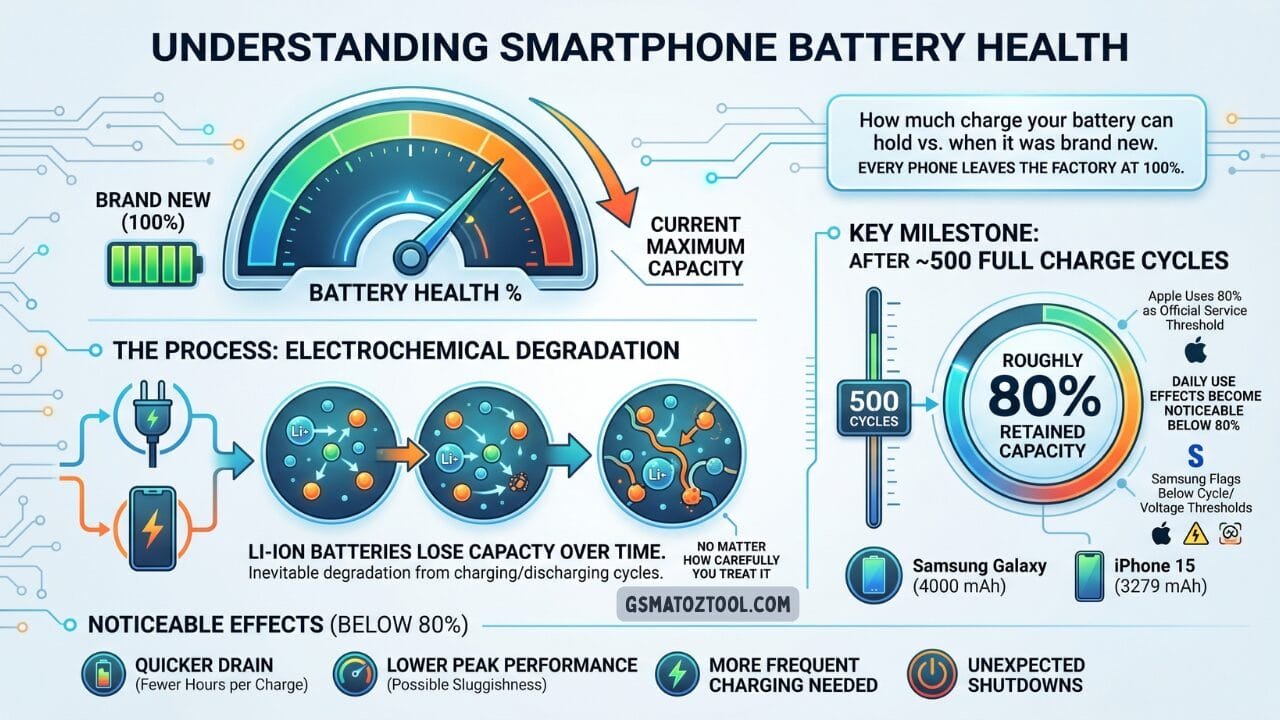
Battery health starts at 100% when your phone is new and gradually decreases with every charge cycle. After around 500 full cycles most batteries retain roughly 80% capacity the point where effects become noticeable in daily use.
Why Battery Health Matters
You Might Wonder: If My Phone Still Works Why Does Battery Health Matter? The Answer Is Simple — A Degraded Battery Affects Your Phone In Ways You Feel Every Single Day. This Is Exactly Why So Many People Search For How To Check Phone Battery Health Before Assuming Their Phone Needs To Be Replaced.
Here Is Why It Matters A Lot.
Shorter Battery Life. A Battery At 75% Health Gives You 75% Of The Screen-on Time You Had When The Phone Was New. If Your Phone Used To Last 10 Hours On A Charge It Now Lasts Around 7.5 Hours — Even With Identical Usage. That Difference Adds Up Fast In A Busy Day.
Unexpected Shutdowns. As Batteries Age They Struggle To Deliver The Sudden Bursts Of Power Needed For Demanding Tasks — Like Opening A Heavy App Turning On The Camera Or Making A Phone Call. If The Battery Cannot Deliver Enough Power The Phone Shuts Off Suddenly Even If The Battery Shows 20% Or 30% Remaining.
Cpu Throttling. Apple Introduced Performance Management In Ios 11.3 Specifically To Prevent Unexpected Shutdowns. When Your Iphone Detects An Aged Battery It Limits Cpu Speed To Reduce Power Demand. This Means Your Phone Becomes Noticeably Slower — Not Because The Processor Is Bad But Because The Battery Cannot Keep Up. Samsung And Other Android Manufacturers Use Similar Techniques To Protect Aging Batteries.
Swelling Risk. In Rare Cases Severely Degraded Batteries Can Swell Due To Gas Buildup Inside The Cells. A Swollen Battery Pushes Against The Screen Or Back Panel Creating A Visible Bulge. This Is A Safety Hazard And Requires Immediate Attention Do Not Ignore It.
Understanding Your Battery Health Gives You Control. You Know Whether Your Slow Phone Needs A Battery Replacement Or A New Device. You Know Whether Your Charging Habits Are Causing Damage. You Know When It Is Time To Act — And When You Can Relax.
Also Read
How To Check Battery Health On Iphone
Apple Provides A Built-in Battery Health Tool On Every Iphone Running Ios 11.3 Or Later. If You Have Ever Wondered How To Check Phone Battery Health On An Iphone The Good News Is That Apple Makes It Completely Straightforward No Third-party Apps Needed.
Step-by-step Instructions
- Open The Settings App On Your Iphone. It Is The Grey Icon With Gears.
- Scroll Down And Tap On “battery.”
- Tap “Battery Health & Charging.” On Older Ios Versions This May Simply Appear As “battery Health.”
- Look At The “maximum Capacity” Percentage At The Top Of The Screen. This Is Your Battery Health Number.
- Read The Status Message Below The Percentage. Apple Provides A Plain-language Description Of Your Battery’s Condition.
What The Status Messages Mean
- Your Battery Is Currently Supporting Normal Peak Performance. This Is The Best Message To See. Your Battery Is Healthy And Your Phone Is Running At Full Speed. No Action Needed.
- This Iphone Has Experienced An Unexpected Shutdown Because The Battery Was Unable To Deliver The Necessary Peak Power. Performance Management Has Been Applied To Help Prevent This From Happening Again.
- Your Battery Has Degraded Enough That Ios Has Stepped In To Throttle Cpu Performance. Your Phone May Feel Slower Than Usual. A Battery Replacement Will Restore Full Speed.
- Your Battery’s Health Is Significantly Degraded. An Apple Authorized Service Provider Can Replace The Battery To Restore Full Performance And Capacity. Apple Is Directly Recommending A Replacement. Your Battery Is Well Below The Healthy Threshold.
- This Iphone Is Unable To Determine Battery Health. This Usually Means The Battery Was Replaced With A Non-apple Part Or There Is A Hardware Issue. It Can Also Appear On Very Old Iphones.
Iphone Battery Health Tips
- Apple Considers Any Battery Above 80% To Be Within Normal Service Specifications. However Many Users Prefer To Replace Their Battery At 85% If They Notice A Significant Drop In Daily Usage Time.
- If You Have An Iphone 11 11 Pro Or 11 Pro Max Apple Released A Recalibration Update That Improves The Accuracy Of Battery Health Reporting On Those Specific Models. The Phone Recalibrates Automatically Over Several Charge Cycles After An Ios Update.
- You Can Also Enable “optimized Battery Charging” On The Same Battery Health Screen. When This Is On Your Iphone Learns Your Daily Charging Routine And Pauses Charging At 80% Overnight Only Completing The Charge To 100% Shortly Before You Typically Wake Up. This Significantly Reduces Battery Stress Over Time.
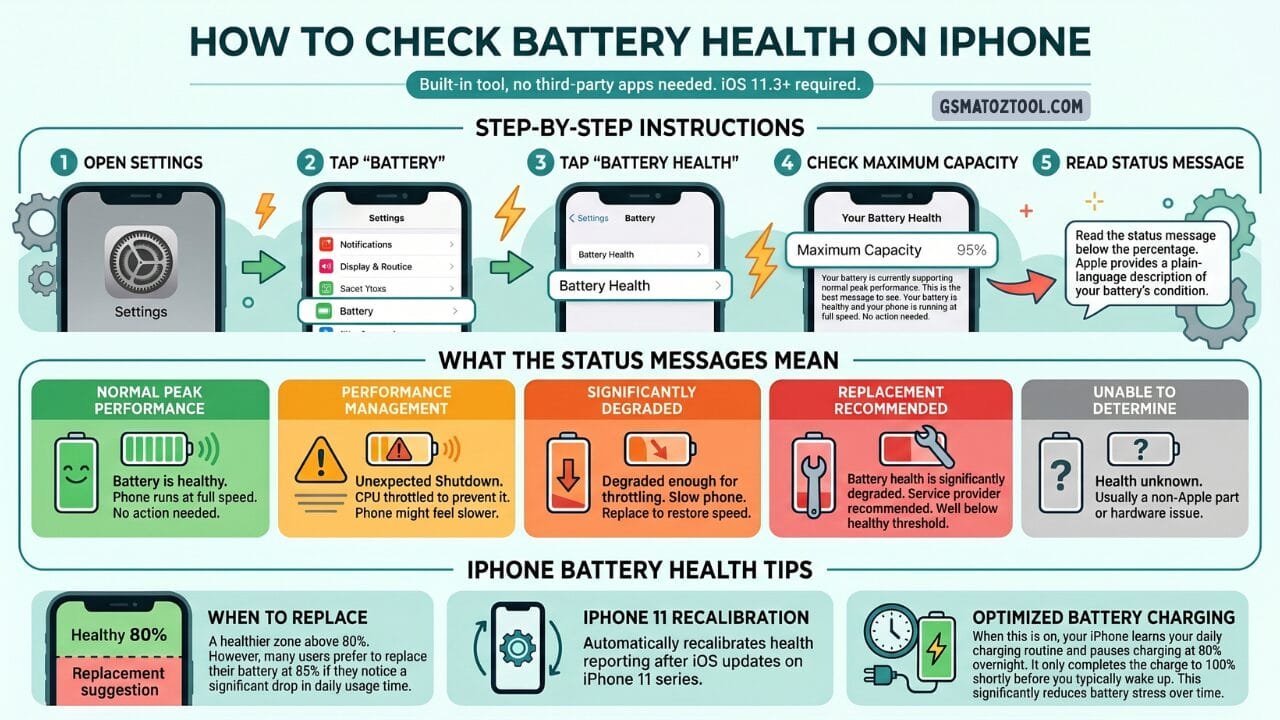
Checking your iphone battery health takes just five taps — open settings tap battery then battery health and read your maximum capacity percentage. Ios 11. 3 or later required no third-party apps needed.
How To Check Battery Health On Samsung Galaxy
Samsung Galaxy Phones Offer Battery Health Checking Through The Samsung Members App. This Is The Most Reliable Method For Samsung Devices And Gives You A Clear Easy-to-understand Result. If You Have Been Searching For How To Check Phone Battery Health On A Samsung You Are In The Right Place — The Process Takes Under Two Minutes And Requires No Technical Knowledge Whatsoever.
Samsung Members App
- Open The Samsung Members App On Your Galaxy Phone. If You Do Not Have It Download It Free From The Galaxy Store Or Google Play Store.
- Tap The “Support” Tab At The Bottom Of The Screen.
- Tap “phone Diagnostics.”
- Tap “test All” To Run A Complete Diagnostic Or Scroll Down And Tap Specifically On “Battery Status.”
- Wait A Few Seconds For The Test To Complete. Your Result Will Appear As One Of Three Statuses: Good Normal Or Replace.
Good Means Your Battery Is In Excellent Condition With No Issues. Normal Means Your Battery Is Functioning Properly But Has Some Age-related Wear. Replace Means Samsung’s System Has Detected That Your Battery Capacity Or Performance Has Degraded Enough To Warrant Replacement.
Hidden Diagnostic Code
On Many Samsung And Android Devices You Can Access A Hidden Engineering Menu By Dialing A Code.
Open Your Phone App And Dial: *#*#4636#*#*
A Menu Called “testing” Or “phone Information” Should Appear Automatically. Tap “battery Information” To See Raw Battery Data Including Charge Level Voltage Temperature And Battery Status.
Note: This Code Does Not Work On All Devices And May Not Show Health Percentage Specifically But It Gives Useful Raw Data About Your Battery’s Current Condition.
Settings Menu
On Some Samsung Phones You Can Find Basic Battery Information At:
Settings → Device Care → Battery
Or On Newer One Ui Versions:
Settings → Battery → Battery Care
This Screen Shows Your Current Charge Estimated Usage Time And Sometimes Battery Protection Settings But It Does Not Always Show The Health Percentage Directly. For A Proper Health Reading The Samsung Members Diagnostic Method Is More Reliable.
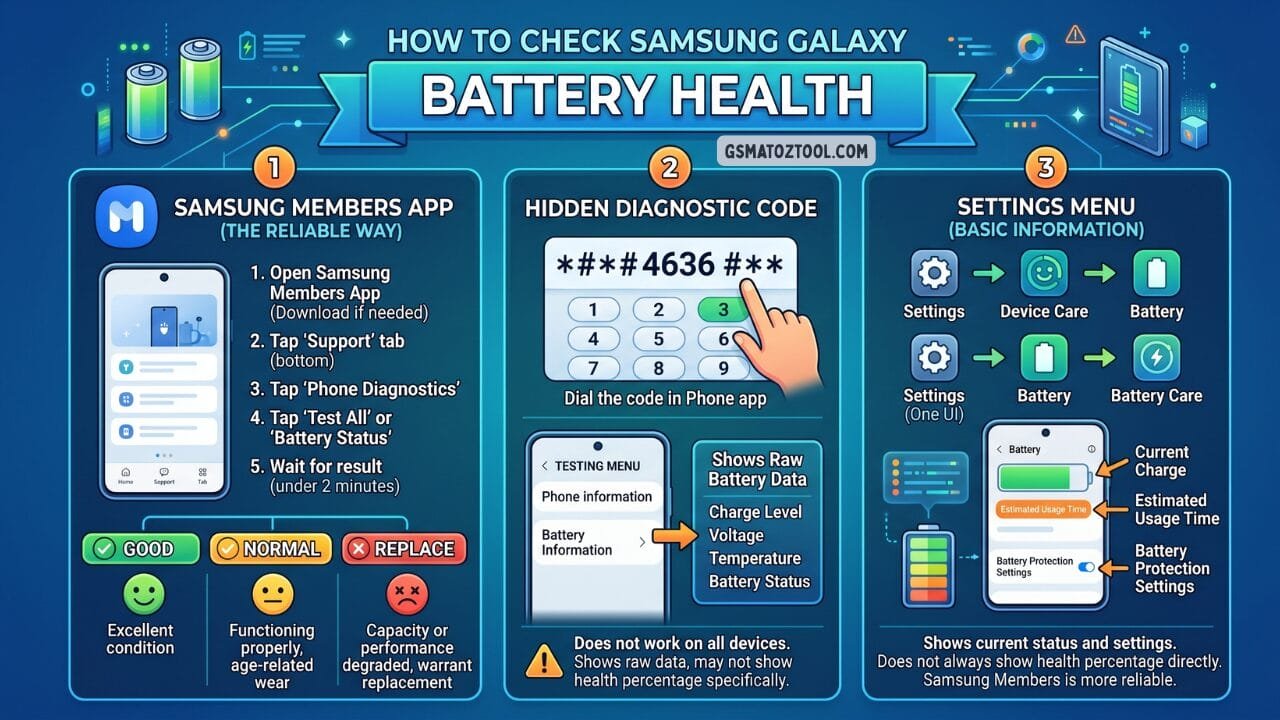
How to check phone battery health there are three ways to check your samsung galaxy battery health the samsung members app is the most reliable giving you a clear good normal or replace result in under two minutes.
How To Check Battery Health On Samsung Galaxy Watch
If You Use A Samsung Galaxy Watch You Can Also Check Its Battery Health Through The Samsung Members App. Most People Focus Only On Their Phone Battery But Your Watch Battery Degrades Just As Fast Sometimes Faster Due To Its Smaller Size And More Frequent Full Charge Cycles. Knowing How To Check Phone Battery Health Is Important But Keeping An Eye On Your Watch Battery Is Equally Worth The Habit.
- Open The Samsung Members App On Your Paired Galaxy Phone.
- Tap The “Support” Tab At The Bottom.
- Tap “Connected Device Diagnostics.”
- From The List Of Diagnostic Options Select “battery Status.”
- The App Will Communicate With Your Watch And Return A Health Status Within A Few Seconds.
This Is Particularly Useful Because Smartwatch Batteries Degrade Faster Than Phone Batteries Due To Their Smaller Size And More Frequent Full Charge Cycles.
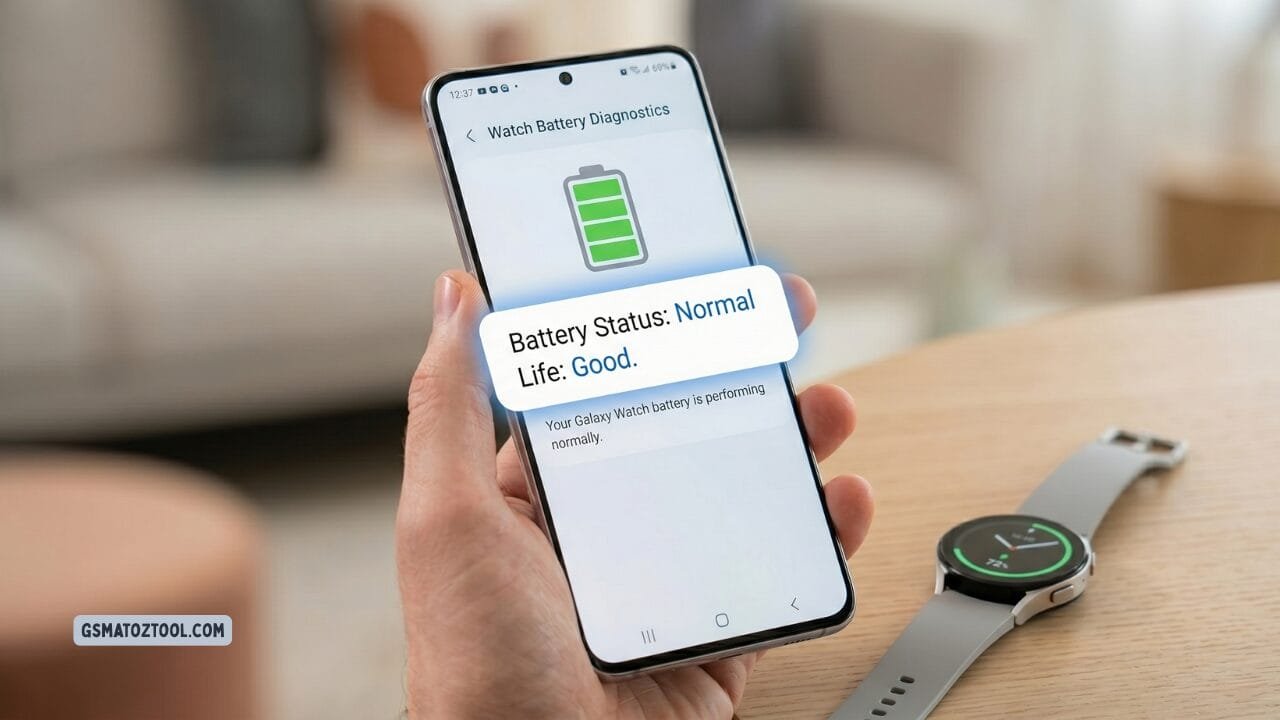
How to check phone battery health a samsung galaxy phone displaying 95% battery health with “life: good” and “status: normal” exactly what you see when you check battery health through the samsung members app or settings.
How To Check Battery Health On Other Android Phones
Android Runs Across Dozens Of Different Manufacturers And Unlike Iphone There Is No Single Universal Method Built Into Every Device. The Steps Vary Depending On Your Brand And Model. But No Matter Which Android Phone You Have There Is Always A Reliable Way To Find Out And Once You Know How To Check Phone Battery Health On Your Specific Device The Whole Process Takes Under A Minute.
Google Pixel
- Google Pixel Phones Running Android 12 Or Later Have A Built-in Battery Health Screen.
- Go To: Settings → Battery → Battery Health
- The Screen Shows A Plain-language Status — Typically “good” “fair” Or “poor.” It Does Not Show An Exact Percentage On Most Pixel Models But The Status Is Reliable.
Xiaomi And Miui Phones
- On Xiaomi Phones Running Miui Go To:
- Settings → About Phone → Battery
- Some Miui Versions Show A Battery Health Percentage Directly On This Screen. On Others You May Need To Go To:
- Settings → Battery → Battery Health
- Alternatively Xiaomi Phones Often Respond To The Hidden Diagnostic Code *#*#4636#*#* Which Can Show Battery Voltage And Status Information.
- Xiaomi Also Has A Built-in Feedback App Called “mi Community” Or “feedback” That Sometimes Includes Battery Diagnostics Depending On Your Device And Region.
Oneplus
- Oneplus Devices Running Oxygenos Can Be Checked At:
- Settings → Battery → Battery Health
- Newer Oneplus Phones Show A Percentage. Older Models May Just Show A Status Label.
Huawei
- On Huawei Devices With Emui:
- Settings → Battery → Remaining Battery Capacity
- Some Huawei Phones Show Actual Capacity In Mah Alongside The Percentage Which Is Particularly Useful For Comparison.
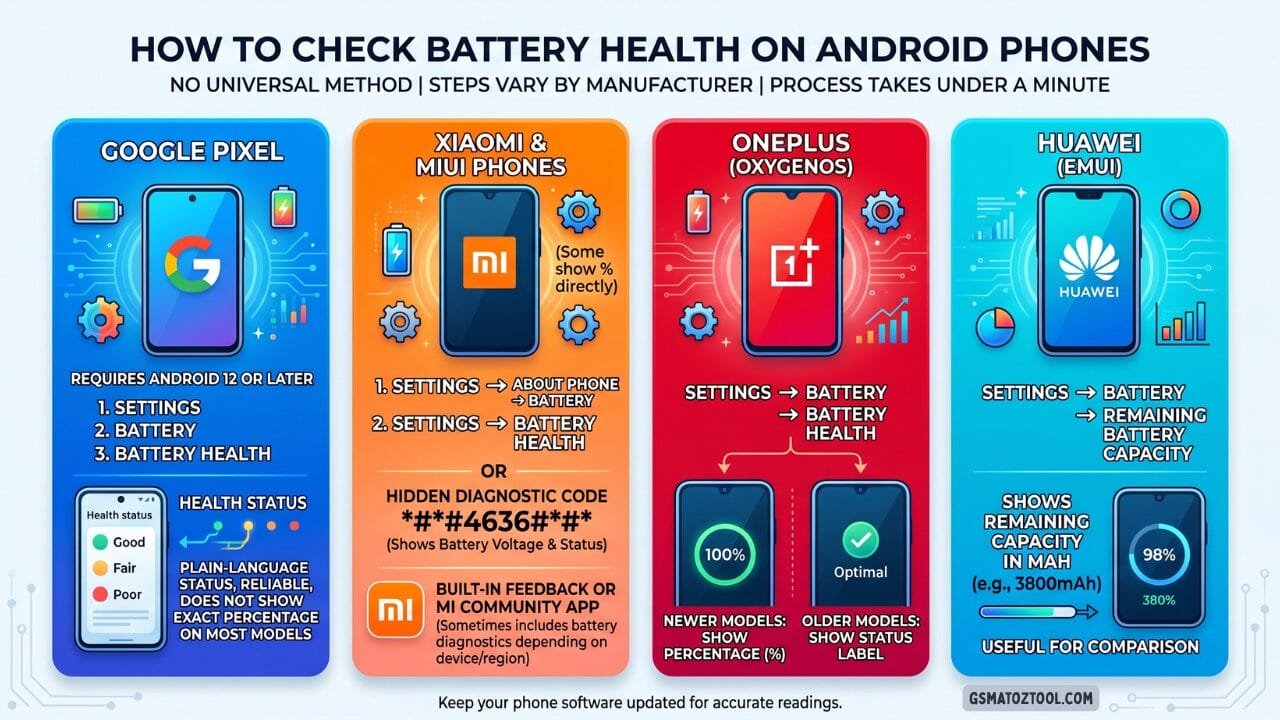
How to check phone battery health no universal method exists for android battery health the steps vary by manufacturer. This guide covers google pixel xiaomi oneplus and huawei with each brand taking under a minute to check.
All Android Devices — Third Party Option
- If Your Phone Does Not Have A Built-in Battery Health Tool The Best Third-party Solution Is Accubattery Available Free On The Google Play Store.
- Accubattery Works By Measuring The Actual Charge Going Into And Out Of Your Battery During Each Charging Session. Over Time — Typically After 5 To 10 Charge Cycles — It Builds An Accurate Picture Of Your Battery’s Real Capacity And Compares It To The Manufacturer’s
- Specified Capacity To Calculate Health Percentage.
- Unlike Apps That Simply Read An Inaccurate System Value Accubattery Uses Real Measurement Data. Many Android Users And Tech Reviewers Consider It The Gold Standard For Android Battery Health Monitoring.
Understanding Your Battery Health Number
Now That You Know How To Check Phone Battery Health On Your Device The Next Step Is Understanding What That Percentage Actually Means In Practical Terms. A Number On Its Own Is Not Very Useful But Once You Know What Each Range Signals You Can Make Smart Decisions About Your Phone And Battery.
- 100% To 85% — Excellent Your Battery Is In Great Shape. You Should Experience Full Battery Life As The Manufacturer Intended. No Action Needed. Focus On Good Charging Habits To Slow Future Degradation.
- 84% To 79% — Good Your Battery Is Aging But Still Performing Well. You May Notice Slightly Shorter Battery Life Compared To When The Phone Was New But Most Users Find This Range Perfectly Acceptable. Continue Monitoring Every Few Months.
- 79% To 70% — Fair At This Level Battery Life Reduction Is Noticeable. A Phone That Once Lasted A Full Day May Now Need A Midday Top-up. Unexpected Shutdowns May Begin To Occur Under Heavy Load. Consider Planning For A Battery Replacement In The Next Few Months.
- Below 70% — Poor Battery Life Is Significantly Impacted. Unexpected Shutdowns Are Common. Your Phone’s Performance May Be Throttled To Protect Against Power Failures. Battery Replacement Is Strongly Recommended. Continuing To Use A Battery At This Level Can Also Put Unnecessary Strain On Other Phone Components.
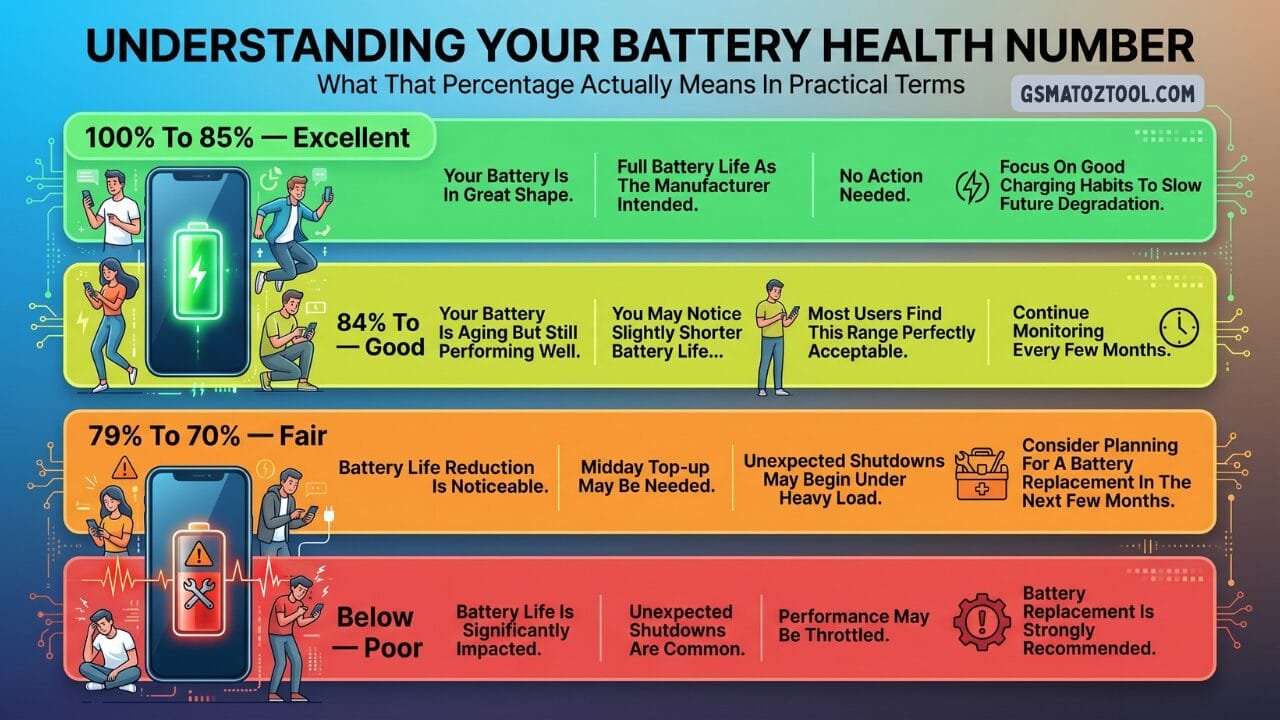
How to check phone battery health your battery health percentage tells you exactly where you stand from excellent at 100% to 85% all the way down to poor below 70% where replacement is strongly recommended.
Common Signs Of A Dying Battery
Sometimes Your Phone Tells You Its Battery Is Failing Before You Even Check The Health Number. These Warning Signs Often Appear Weeks Or Even Months Before The Battery Reaches A Critically Low Percentage — So Knowing Them Is Just As Important As Knowing How To Check Phone Battery Health On Your Device.
- Your Phone Dies Suddenly While Still Showing 15% To 30% Remaining Charge. This Is One Of The Clearest Signs Of Battery Degradation — The Battery Can No Longer Accurately Report Its Own State And Collapses Under Load Before Reaching Zero.
- Battery Drains Much Faster Than It Used To. If You Used To End The Day With 30% Left And Now You Are Reaching For The Charger By Early Afternoon With The Same Usage Pattern Your Battery Capacity Has Declined Significantly.
- Your Phone Gets Unusually Hot During Normal Use — Not Just During Gaming Or Video Calls But During Regular Browsing Or Music Playback. Heat During Light Use Suggests The Battery Is Working Harder Than It Should To Deliver Power.
- Performance Feels Slower Than It Used To Especially When Opening Apps Switching Between Tasks Or Using The Camera. This Is Often Caused By The Phone’s Automatic Performance Throttling To Protect Against Battery-related Shutdowns.
- The Battery Percentage Jumps Erratically. It Might Drop From 45% To 15% In Minutes Then Slowly Climb Back When You Plug In. This Indicates The Battery’s Internal Voltage Is Unstable.
- You Notice A Physical Bulge On The Back Of Your Phone Or A Slight Gap Where The Screen Meets The Body. This Is Battery Swelling — Stop Using The Phone Immediately And Seek A Replacement. Do Not Attempt To Puncture Or Remove A Swollen Battery Yourself.
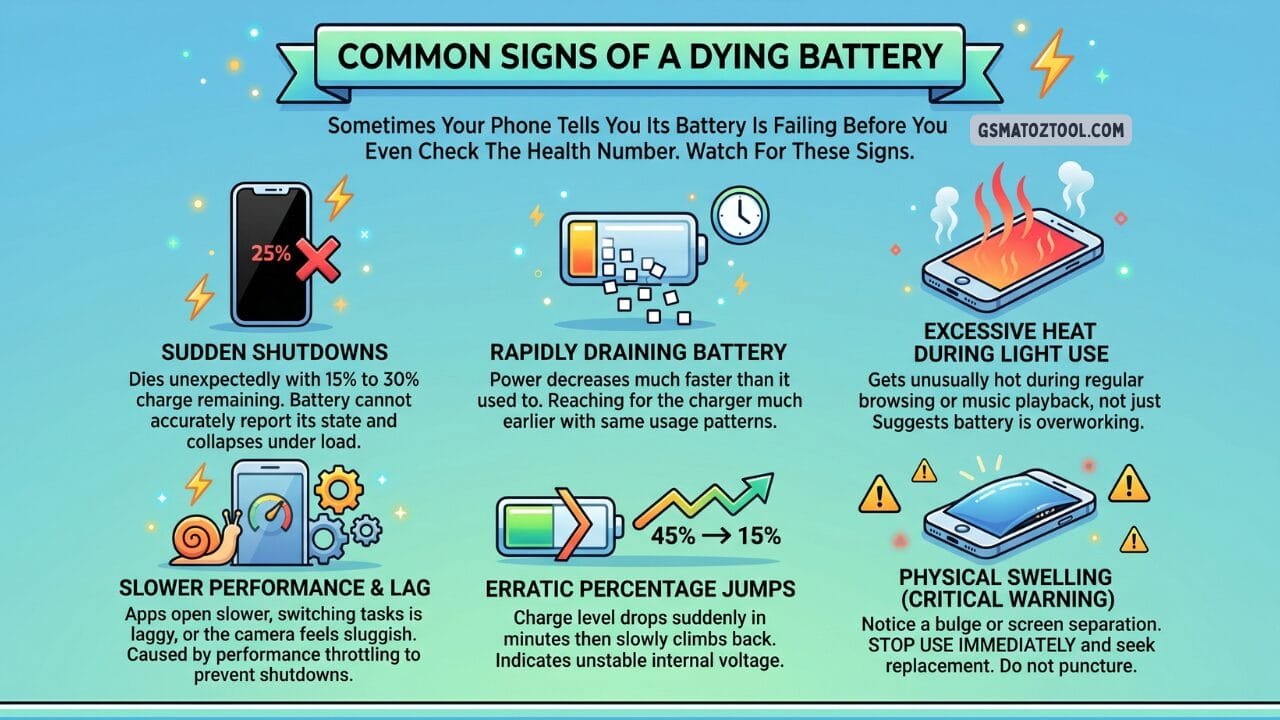
How to check phone battery health your phone often warns you its battery is failing before you even check the health number. Watch for these six signs — especially physical swelling which is a critical safety warning requiring immediate action.
Smart Charging Habits That Extend Battery Life
The Way You Charge Your Phone Has A Bigger Impact On Long-term Battery Health Than Almost Anything Else. These Habits Make A Real Difference — And The Good News Is That Once You Know How To Check Phone Battery Health You Can Actually Track Whether These Habits Are Working By Monitoring Your Degradation Rate Over Time.
Keep Your Battery Between 20% And 80%. Lithium-ion Batteries Experience The Least Stress In This Middle Range. Charging From 80% To 100% And Discharging From 20% To 0% Are Both Harder On The Chemistry Than Staying In The Middle. You Do Not Need To Be Obsessive About This But Avoiding Regular Full Cycles Helps Considerably.
Enable Optimized Or Adaptive Charging. Apple Samsung Google And Most Android Manufacturers Now Include A Smart Charging Feature That Learns Your Routine And Slows Charging To Protect The Battery Overnight. On Iphone It Is Called Optimized Battery Charging. On Samsung It Is Protect Battery (Which Caps Charging At 85%). Turn These On And Leave Them On.
Avoid Extreme Temperatures. Heat Is The Single Biggest Accelerator Of Battery Degradation. Do Not Leave Your Phone On A Car Dashboard In Summer. Do Not Charge It While Gaming With It Sitting On A Thick Blanket That Traps Heat. Remove Thick Cases While Gaming If Your Phone Gets Hot. Cold Is Also Bad For Batteries — Below Freezing Lithium-ion Batteries Lose Capacity Temporarily And Can Be Permanently Damaged If Charged In Very Cold Conditions.
Do Not Use Your Phone Intensively While Charging. Heavy Use During Charging Creates A Lot Of Heat Simultaneously Which Is Particularly Damaging To Battery Chemistry.
Use The Right Charger. Fast Charging Is Convenient But Generates More Heat Than Standard Charging. If You Are Not In A Hurry Using A Slower Charger Overnight Is Kinder To The Battery. Use Official Or Certified Chargers — Cheap Uncertified Chargers Can Deliver Inconsistent Voltage That Stresses The Battery.
Do Not Sleep With Your Phone Plugged In To 100% Regularly. A Battery That Sits At 100% Charge Generates More Heat And Stress Than One Maintained In The 50–80% Range. If You Charge Overnight Use Your Phone’s Optimized Charging Feature To Manage This Automatically.
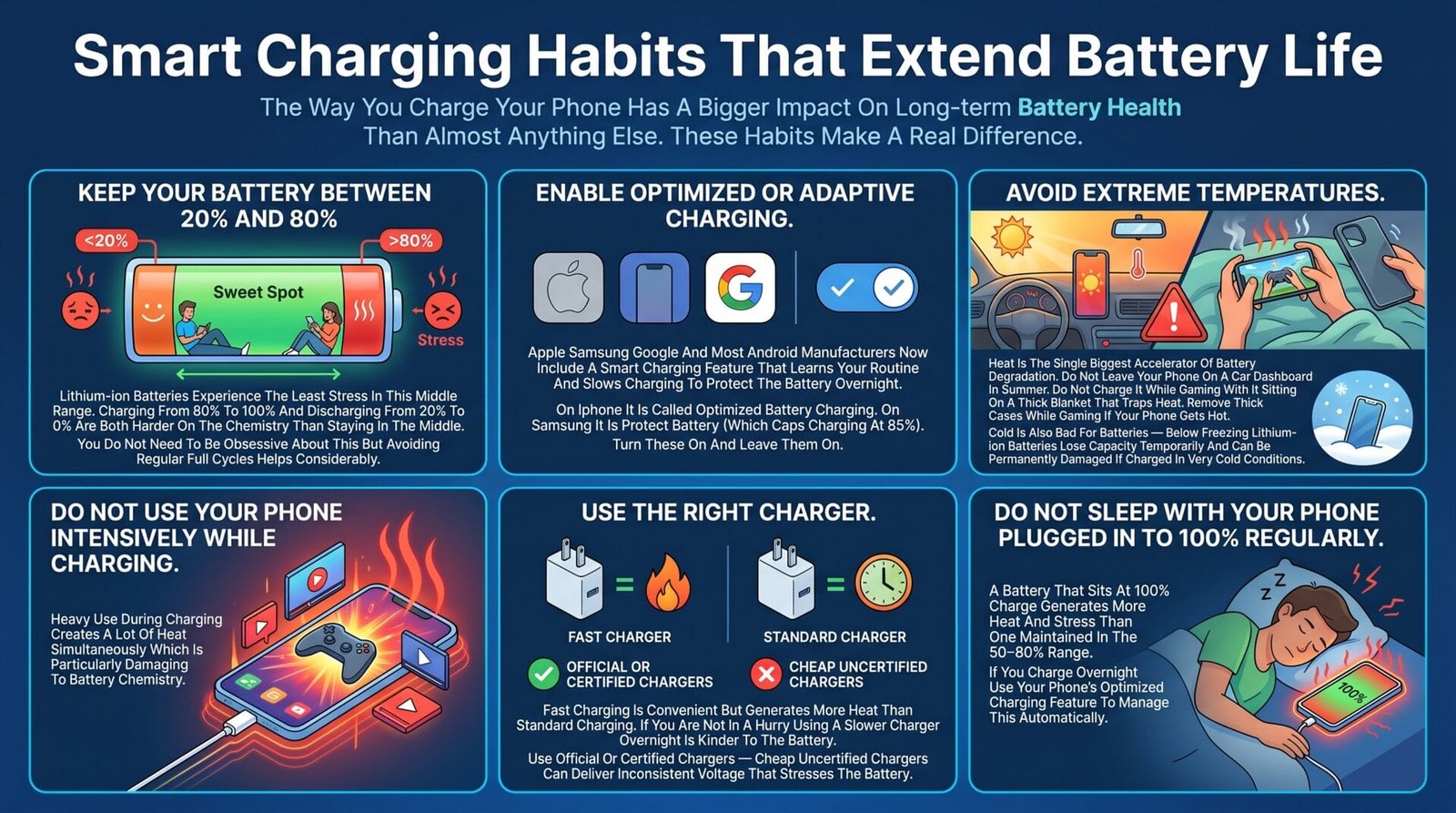
How to check phone battery health the way you charge your phone matters more than anything else for long-term battery health. These six habits especially keeping your battery in the 20% to 80% sweet spot — can add years to your battery’s life.
Optimize Your Settings To Save Battery Life
Beyond Charging Habits Your Daily Settings Have A Major Impact On How Fast Your Battery Drains And A Well-optimized Phone Puts Significantly Less Strain On An Aging Battery. Once You Know How To Check Phone Battery Health And Understand Your Number Optimizing These Settings Is The Next Smartest Step You Can Take.
Screen Brightness Is The Largest Single Drain On Most Phones. Enable Auto-brightness And Let Your Phone Adapt To Ambient Light. When Indoors Manually Lower Brightness Further. Using Dark Mode Also Reduces Power Consumption Significantly On Phones With Oled Screens Because Oled Pixels Consume No Power When Displaying True Black.
Background App Refresh Allows Apps To Update Their Content Even When You Are Not Using Them. Go Through Your App List And Disable This For Apps That Do Not Need Real-time Updates — Social Media Apps Games And News Readers Are The Main Culprits.
Location Services Drain Battery Constantly When Many Apps Are Tracking Your Position. Go To Your Location Settings And Change Most Apps From “always” To “while Using The App” Or “never.” Only Navigation And Emergency Apps Genuinely Need Constant Location Access.
Push Email And Notifications Wake Your Phone’s Processor Repeatedly Throughout The Day. If You Check Email Manually Switch From Push To Fetch — And Set Fetch Intervals To Every 30 Minutes Instead Of Every Minute.
Wi-fi And Bluetooth Use Very Little Power When Connected But Searching For Signals When Not Connected Drains The Battery Faster. Turn Off Wi-fi And Bluetooth When You Are In Areas With No Networks To Connect To.
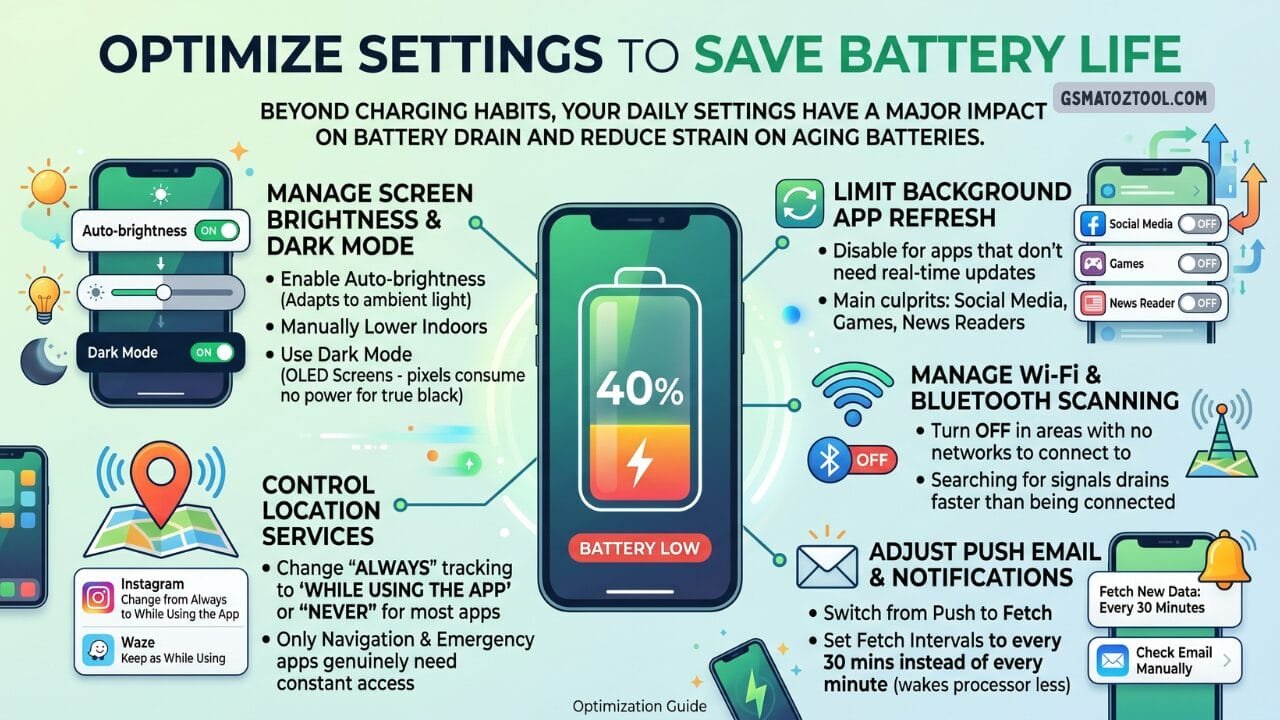
How to check phone battery health your daily settings matter just as much as your charging habits. Turning off background app refresh for social media games and news readers alone can noticeably extend your battery life every single day.
When To Replace Your Battery
Battery Replacement Is One Of The Most Cost-effective Phone Upgrades Available. A New Battery In A 2 Or 3 Year Old Phone Often Makes It Feel Completely Brand New Restoring Full Battery Life Eliminating Throttling And Ending Unexpected Shutdowns For Good. Before Spending Hundreds On A New Device It Is Always Worth Learning How To Check Phone Battery Health First Because A Simple Battery Swap Might Solve Everything.
Consider Replacing Your Battery When:
- Your Iphone Battery Health Drops Below 80% And Apple Is Recommending Service.
- Your Samsung Members Diagnostic Returns A “replace” Result.
- Your Phone Regularly Shuts Down Unexpectedly Despite Showing Remaining Charge.
- You Can No Longer Get Through A Normal Workday Without Charging And Your Usage Has Not Changed.
- Performance Throttling Has Been Applied And You Want Your Phone’s Full Speed Back.
- Your Battery Is Visibly Swollen.
Where To Get A Battery Replaced
Apple: Apple Offers Battery Replacement Through Apple Stores And Apple Authorized Service Providers. Out-of-warranty Replacement Is A Flat Fee Depending On Your Iphone Model. Applecare+ Covers Battery Replacement At No Extra Cost If The Battery Holds Less Than 80% Of Its Original Capacity.
Samsung: Samsung Offers Battery Replacement Through Samsung Experience Stores And Authorized Service Centers. Cost Varies By Model. Samsung Care+ Subscribers May Have This Covered.
Third-party Repair Shops: Independent Repair Shops Often Offer Battery Replacements At Lower Cost Than Manufacturer Service Centers. Use Reputable Shops That Use Quality Replacement Batteries — Cheap Off-brand Batteries Can Perform Worse Than Your Degraded Original.
Self-repair: Apple And Samsung Have Both Launched Self-repair Programs That Allow Users To Purchase Genuine Parts And Tools To Replace Batteries Themselves. This Is An Option For Technically Confident Users.
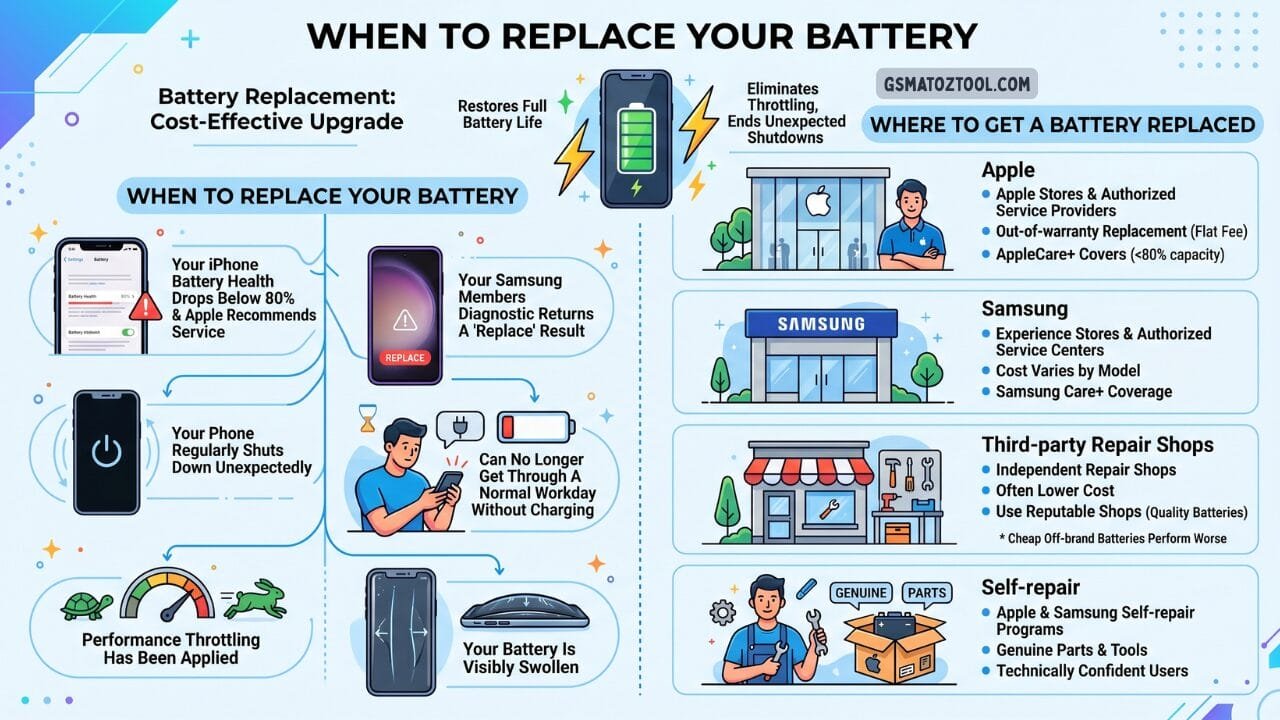
How to check phone battery health battery replacement is one of the most cost-effective phone upgrades available. Knowing when to replace — and where to go — can save you hundreds of dollars compared to buying a new phone.
Frequently Asked Questions (FAQs)
Does Charging Overnight Damage My Battery?
It Can Contribute To Degradation Over Time. Modern Phones Stop Drawing Current Once Fully Charged But Sitting At 100% For Extended Periods Still Generates Heat And Stress. Using Optimized Charging Features Eliminates Most Of This Concern.
Is It Bad To Use My Phone While Charging?
Occasional Use While Charging Is Fine. Heavy Use — Gaming Video Calls Intensive Apps — While Charging Generates Significant Heat Simultaneously Which Accelerates Degradation. For Heavy Tasks Charge First Then Use Or Use A Cooling Pad.
Does Wireless Charging Damage The Battery More Than Wired?
Wireless Charging Generates Slightly More Heat Than Wired Charging Which Means It Can Contribute Marginally More To Degradation. For Daily Use The Difference Is Small But For Overnight Charging Wired Is Preferable.
Can I Restore Battery Health?
No. Battery Degradation Is A Physical And Chemical Process That Cannot Be Reversed With Software Recalibration Or Any Charging Trick. Recalibrating (fully Draining Then Fully Charging) Only Improves The Accuracy Of The Percentage Display — It Does Not Restore Actual Capacity.
How Often Should I Check My Battery Health?
Checking Every Three Months Gives You A Useful Picture Of How Quickly Your Battery Is Aging. Most Batteries Lose Around 1–2% Capacity Per Month With Normal Use.
How Long Do Phone Batteries Last?
Most Phone Batteries Are Designed To Retain 80% Capacity After 500 Full Charge Cycles. At Typical Usage Patterns Of Around One Charge Cycle Per Day That Is Roughly 18 Months To 2 Years Before Reaching The 80% Threshold. With Good Habits Many Users Keep Their Batteries Above 85% For 2.5 To 3 Years.
How To Check Phone Battery Health On Iphone?
Open Settings Tap Battery Then Tap Battery Health And Charging. Your Maximum Capacity Percentage Appears Instantly — No Third-party App Needed.
How To Check Phone Battery Health On Samsung?
Open The Samsung Members App Tap Support Then Phone Diagnostics And Select Battery Status. You Will Get A Clear Good Normal Or Replace Result In Under Two Minutes.
Final Thoughts
Your Phone’s Battery Is A Consumable It Ages No Matter What You Do. But Knowing How To Check Phone Battery Health Understanding What The Numbers Mean And Building A Few Smart Habits Can Add A Year Or More To Your Battery’s Useful Life And Save You Hundreds Of Dollars In Unnecessary Phone Upgrades.
Check Your Battery Health Today. On Iphone It Takes Thirty Seconds. On Samsung The Members App Walks You Through It In Under A Minute. On Other Android Devices Accubattery Will Give You A Reliable Reading After A Few Charge Cycles. Once You Know How To Check Phone Battery Health On Your Specific Device The Rest Becomes Simple. The Number Tells You Everything — And The Action You Take From There Is What Makes The Difference.
If Your Battery Is Above 85% You Are In Great Shape — Focus On The Charging Habits Outlined In This Guide. If You Are Between 79% And 85% Keep Monitoring And Start Planning. If You Are Below 79% A Battery Replacement Will Almost Certainly Make Your Phone Feel Significantly Better And Is Worth Every Penny. Your Phone Works Hard Every Day. Give Its Battery The Attention It Deserves.