Safina pro tool used for xiaomi flashing frp account removal and fastboot to edl services
If You’ve Ever Been Stuck With A Xiaomi Phone That Just Won’t Cooperate You Know How Annoying It Feels. Frp Locks Fastboot Errors Or A Device That Refuses To Reboot Can Turn A Simple Task Into A Headache. That’s Usually The Moment People Start Searching For Safina Pro Tool Hoping To Find Something That Actually Works Instead Of Wasting More Time.
In This Blog You’ll Learn What Safina Pro Tool Really Offers And Why So Many Users Rely On It. We’ll Break Down Its Xiaomi Services Qualcomm And Mediatek Support Frp Account Removal Fastboot To Edl Options And Even Support For Honor And Samsung Frp. Everything Is Explained In A Clear Simple Way So You Can Decide If This Tool Is Exactly What You Need And Confidently Move Forward.
Safina Pro Tool For Xiaomi Fastboot To Edl & Frp Account Removal
Getting Locked Out Of A Xiaomi Phone Can Feel Overwhelming Especially When You Don’t Know Which Tool You Can Trust. Many Users Face Issues Like Frp Locks Fastboot Mode Errors Or Phones That Won’t Reset Through Normal Methods. After Trying Random Solutions Online You Just Want Something That Works Without Risking Your Device. That’s Exactly Why So Many People Search For Safina Pro Tool When Dealing With Xiaomi Software Problems.
This Guide Explains What The Tool Does How It Works And Why It’s Widely Used For Xiaomi Services. You’ll Get A Clear Idea Of Its Features Supported Modes And Whether It’s The Right Choice For Your Situation. Everything Is Explained In Simple Terms So You Don’t Need To Be A Technician To Understand It.
Also Read
Whatsapp Group
- GSM ATOZ TOOL :: Group Link Join
- GSM ATOZ TOOL 1:: Group Link Join
- GSM ATOZ TOOL 2 :: Group Link Join
- GSM ATOZ TOOL 3 :: Group Link Join
- GSM ATOZ TOOL 4 :: Group Link Join
- GSM ATOZ TOOL 5:: Group Link Join
- GSM ATOZ TOOL 6 :: Group Link Join
- Gsm Atoz Tool Remotely Services :: Group Link Join
- Telegram Group GSM ATOZ TOOL :: Group Link Join
- Telegram Group GSM ATOZ TOOL 1 :: Group Link Join
What Is The Safina Pro Tool
Safina Pro Tool Is A Trusted Solution For Flashing Xiaomi Devices And Handling Advanced Software Tasks In Real Time. It Supports Xiaomi Services Across Qualcomm And Mediatek V5/v6 Platforms Making It Useful For A Wide Range Of Models. With Features Like Mi Assistant Reading Device Information (free) And Mi Assistant Factory Reset (free) It Helps You Quickly Check And Reset Phones Without Complex Steps.
Many Users Rely On It When Normal Reset Options Fail Or When A Phone Is Stuck In Fastboot Mode. What Makes This Tool Stand Out Is Its Support For Authorized Operations.
You Can Perform Mi Assistant Factory Reset + Frp Reset (auth) Fastboot To Edl (auth) And Unlock Bootloader (auth) When Required. It Also Includes Utilities Like Checking Xiaomi Activation Lock For Free Which Saves Time Before Attempting Repairs. In Short Safina Pro Tool Gives You Control Over Common Xiaomi Lock And Flashing Problems In One Place.
Safina Pro Tool Latest Versoin Free Download
The Latest Version Of The Tool Is Designed To Be Simple Stable And Effective For Both Beginners And Experienced Users. You Can Use Free Options Such As Reading Device Information Basic Mi Assistant Factory Reset And Xiaomi Activation Lock Checks Without Paying Anything. For Advanced Needs Authorized Services Handle Frp Account Removal Fastboot Reboot To Edl And Secure Bootloader Unlocking.
This Balance Makes It Practical For Everyday Fixes And More Serious Repair Tasks. Once Installed The Interface Guides You Step By Step So You’re Not Guessing What To Do Next. For Example If A Phone Is Locked After A Reset You Can Verify The Lock Status Then Choose The Correct Frp Service.
The Tool Also Supports Additional Services Like Honor Frp Key And Samsung Frp Remove Which Adds Extra Value. If You’re Looking For A Trusted Tool For Flashing Xiaomi Devices With Online Services In Real Time This Solution Is Worth Considering.
Features Of Safina Pro Tool
Mi Asisstant
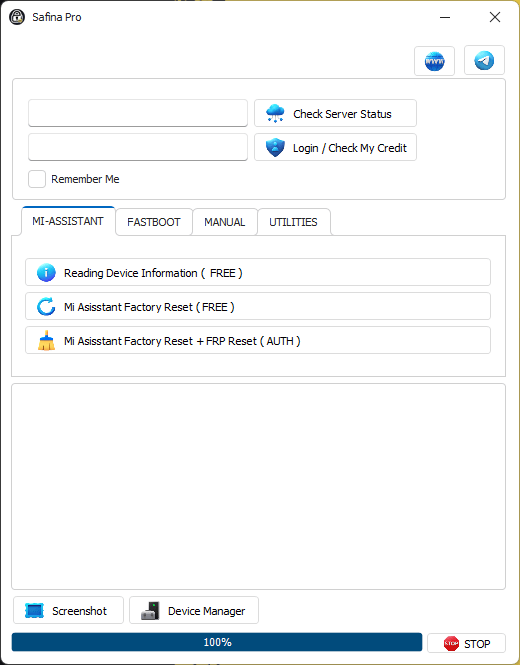
Safina pro tool helps unlock reset and flash xiaomi devices using fastboot edl and frp services.
- Reading Device Information (Free)
- Mi Asisstant Factory Reset (Free)
- Mi Asisstant Factory Reset + Frp Reset (Auth)
Fastboot
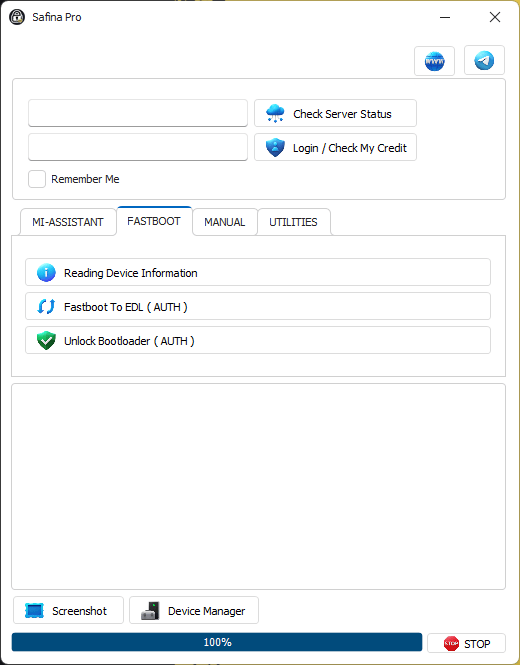
Download safina pro tool to manage xiaomi flashing fastboot to edl and frp account removal easily.
- Reading Device Information
- Fastboot To Edl (Auth)
- Unlock Bootloader (Auth)
Manual

Safina pro tool free download for managing xiaomi devices with fastboot to edl frp reset and mi assistant features.
- Mi Asisstant Factory Reset + Frp Reset
- Fastboot To Edl (Auth)
- Unlock Bootloader (Auth)
Utilities

Download safina pro tool to manage xiaomi fastboot edl flashing and frp account removal easily.
- Check Xiaomi Activation Lock (Free)
How To Use?
- You Will Need To First Download The Zip From The Below Link.
- Then, Unzip All The Files In The C Drive.
- Then, Install The Setup With The Basic Instructions.
- Run The Tool As Admin “Safina Pro Tool.exe“
- If You Already Have Drivers Installed, Skip This Step.
- Enjoy ! !
Final Thoughts
If You Often Deal With Xiaomi Phones Stuck In Fastboot Frp Lock Or Reset Loops Having The Right Tool Matters. Safina Pro Tool Combines Free Utilities With Powerful Authorized Features All In A User-friendly Setup. Used Correctly It Can Save You Hours Of Frustration And Help Bring Locked Devices Back To Life Safely.
How To Download
To Download Safina Pro Tool Follow These Steps:
- Go To The Gsmatoztool.com Website Of Safina Pro Tool.
- Find The Download Page And Click On The (Download Link)
- Below Buttons Are Advertisements. Please Use The Download Links Above.
- Wait For The Download To Complete.
- Locate The Downloaded File On Your Device Once The Download Is Finished.
- Double-click On The File To Start The Installation Process.
- Follow The On-screen Instructions To Complete The Installation.
Safina Pro Tool
Download Link:: Usersdrive – Mediafire – 4shared – My.pcloud – Playbook – Limewire – Disk.Yandex – DropBox – Mega