
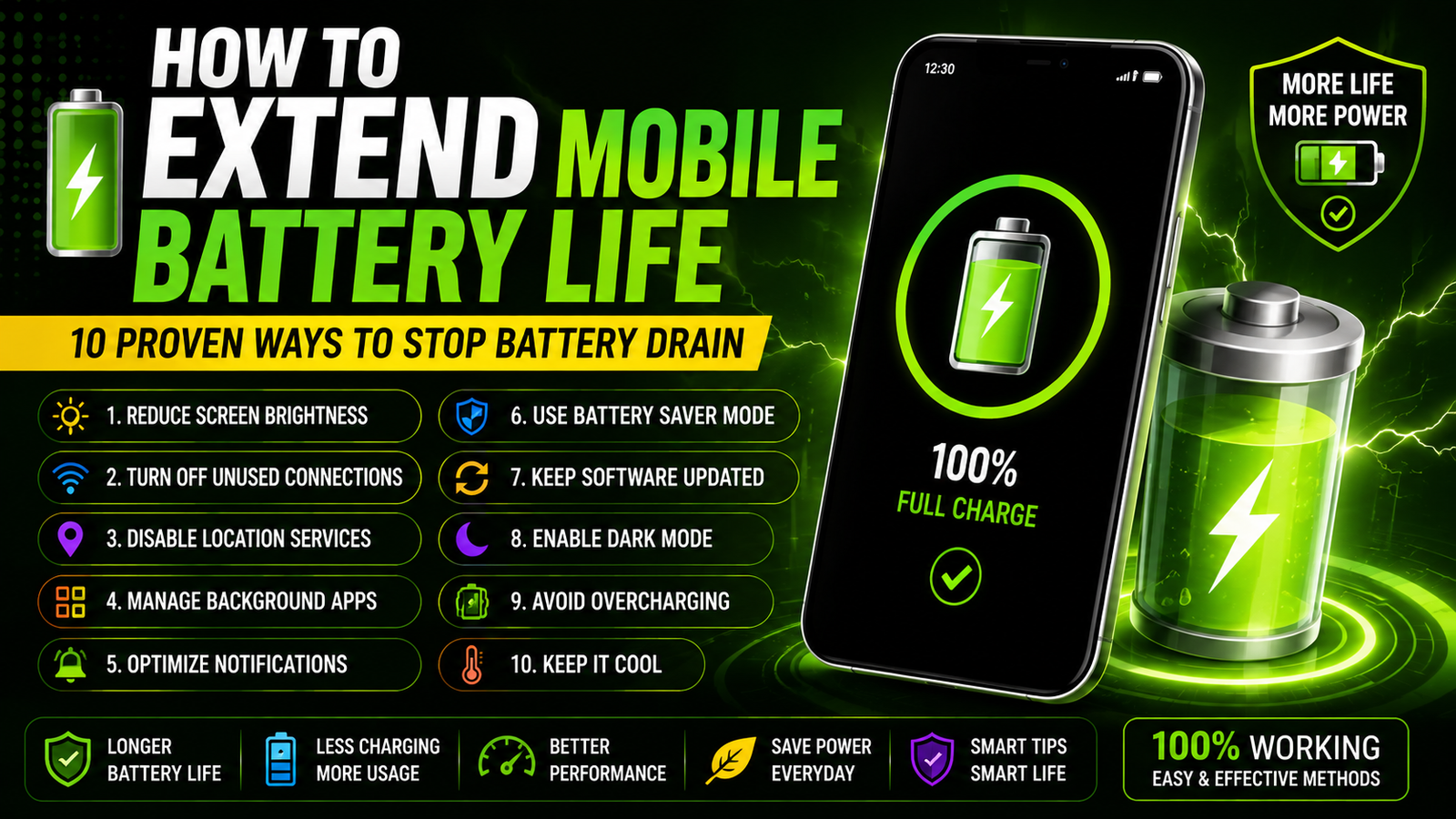
How to extend mobile battery life — 10 proven ways to stop battery drain including reduce screen brightness turn off unused connections disable location services manage background apps optimize notifications use battery saver mode keep software updated enable dark mode avoid overcharging and keep it cool. Longer battery life less charging better performance and smart tips for everyday use.
Your Phone Battery Shouldn’t Feel Like A Melting Ice Cube—100% In The Morning Panic Mode By Lunch. Yet Background Apps Bright Screens Weak Signals Outdated Settings And Sneaky Power-hungry Features Can Drain Your Mobile Faster Than You Realize.
The Good News? You Don’t Need A New Phone Or A Bulky Power Bank To Fix It. Learning How To Extend Mobile Battery Life With A Few Smart Adjustments Can Help You Stop Battery Drain Fast.
These Simple Tricks Keep Your Device Running Longer When You Need It Most. Here Are 10 Proven Ways To Make Every Percentage Count Throughout Your Day.
Understanding The Key Factors That Drain Mobile Battery Life
Bright Screen Settings And Long Display Timeout Periods Are Major Reasons Your Phone Loses Power Quickly. The Display Often Consumes More Energy Than Most Other Components. Meanwhile Background Apps Automatic Syncing And Frequent Notifications Can Quietly Drain The Battery.
This Happens Even When You Are Not Actively Using Your Mobile Device. Poor Network Signals Make Your Phone Work Harder To Stay Connected. Constant Gps Tracking Bluetooth Wi-fi Scanning And Mobile Data Usage Add Extra Pressure.
Over Time Weak Battery Health Extreme Temperatures Outdated Software And Power-hungry Apps Can Reduce Efficiency. Understanding These Common Causes Is An Important First Step In Learning How To Extend Mobile Battery Life And Stop Unnecessary Drain.
Best Settings To Optimize Your Phone’s Battery Performance
Lowering Screen Brightness Or Enabling Adaptive Brightness Is One Of The Easiest Ways To Reduce Display Power Use. This Simple Step Helps Slow Battery Drain Throughout The Day. Turning On Battery Saver Mode Gives Your Phone Extra Efficiency.
It Does This By Limiting Background Activity Reducing Animations And Cutting Unnecessary Power Consumption. Another Smart Step Is Disabling Unused Features Such As Bluetooth Gps Wi-fi And Mobile Hotspot When You Do Not Need Them.
These Features Keep Searching Tracking Or Sharing Connections In The Background. Set Apps To Update Less Often And Restrict Background Refresh So Your Phone Saves Power For Essential Tasks Like Calls And Messages.
Apps And Features That Impact How Long Your Battery Lasts
Checking Your Phone’s Battery Usage Settings Helps You Quickly Spot Power-hungry Apps. These Are The Ones That Keep Draining Energy In The Background. Once Identified Limit Background Activity For Apps You Do Not Need Running All Day.
Pay Special Attention To Social Media Streaming Gaming And Navigation Apps. Turning Off Unused Features Such As Bluetooth Gps And Wi-fi Scanning Prevents Your Device From Wasting Power. Always Close Heavy Apps Properly After Using Them.
Reduce Refresh Activity So They Stop Pulling Data When Idle. Built-in Tools Like Battery Saver Adaptive Brightness Dark Mode And Background App Restrictions Can Further Reduce Power Demand.
Charging Habits That Help Extend Mobile Battery Lifespan
Charging Your Phone In Short Regular Sessions Is A Smart Way To Protect Battery Health. It Is Especially Helpful If You Keep The Charge Level Between 20% And 80%. Instead Of Letting The Battery Fall To 0% Plug It In Earlier.
This Reduces Stress On The Cells And Prevents Faster Long-term Wear. Leaving Your Mobile Connected At 100% For Many Hours Can Also Shorten Its Lifespan. Always Unplug It Once It Has Enough Power For Your Daily Use.
Using The Original Charger Or A Certified Replacement Helps Deliver Stable Power. This Lowers The Risk Of Overheating Or Voltage Strain. For Safer Charging Place Your Phone In A Cool Well-ventilated Area.
Essential Maintenance Tips For Long-lasting Mobile Power
Protecting Your Phone’s Battery Starts With Smart Charging Habits Such As Avoiding Full Discharges. Unplugging It Around 80% To 90% When Possible Is Highly Recommended. Lower Screen Brightness Enable Adaptive Brightness And Shorten The Screen Timeout Setting.
This Reduces One Of The Biggest Sources Of Daily Power Drain. To Limit Background Battery Use Close Apps You Are Not Using. Disable Unnecessary Notifications And Turn Off Location Bluetooth And Wi-fi When They Are Not Needed.
For Better Long-term Battery Life Keep Your Device Away From Extreme Heat. Use Reliable Chargers And Install Software Updates Regularly. This Ensures Your Phone Runs Efficiently And Safely For A Much Longer Time.
Why Mobile Batteries Drain Quickly: Common Causes
Bright Screens And Long Timeout Settings Often Cause Fast Mobile Battery Drain. The Display Uses A Large Amount Of Power During Daily Use. Background Apps Automatic Syncing And Frequent Notifications Continue Working Even When Your Phone Is Idle.
Battery-saving Settings Can Make A Noticeable Difference Here. Weak Network Signals Force The Device To Search Harder For A Connection. Gps Tracking Bluetooth And Wi-fi Scanning Add Extra Power Demand On The System.
Old Batteries Naturally Lose Efficiency Over Time. Outdated Software Or Power-hungry Apps Can Make The Problem Worse. Regular Updates Battery Health Checks And Tighter Background Controls Help Your Phone Use Energy More Wisely.
Optimizing Settings To Extend Mobile Battery Life
Reducing Screen Brightness Or Switching On Adaptive Brightness Is A Fast Way To Cut Mobile Battery Drain. The Display Always Uses A Large Share Of Power. Battery Saver Mode Can Limit Background Activity And Visual Effects That Consume Energy.
Another Smart Step Is Disabling Bluetooth Gps Wi-fi And Mobile Hotspot Whenever They Are Not In Use. This Stops Your Device From Searching Tracking Or Sharing Connections Unnecessarily. Adjust App Notifications Background Refresh And Location Permissions For Better Control.
This Ensures Only Essential Apps Keep Running Or Updating In The Background. These Simple Setting Changes Help Your Phone Conserve Power Without Making Your Everyday Phone Use Difficult.
Essential Apps And Tools For Battery Management
Using Your Phone’s Built-in Battery Settings Is An Easy Way To Find Power-hungry Apps. You Can Limit Their Background Activity Before They Drain Too Much Energy. A Trusted Battery Monitoring App Can Also Help You Track Usage Patterns.
These Apps Monitor Charging Habits And Temperature Changes That Affect Long-term Performance. Enabling Battery Saver Or Low Power Mode Gives Your Device Extra Support. It Automatically Reduces Background Processes Lowers Screen Brightness And Pauses Unnecessary Syncing.
Uninstalling Or Disabling Apps That Constantly Refresh Or Send Frequent Notifications Is Highly Effective. If An App Offers Little Daily Value Remove It To Stop Battery Drain Fast.
Charging Habits That Can Help Your Battery Last Longer
Short Mindful Charging Habits Can Make A Real Difference In How Long Your Mobile Battery Stays Healthy. Instead Of Waiting For The Battery To Drain Completely Plug Your Phone In For Short Bursts. Unplug It Before It Remains At 100% For Too Long.
Keeping The Charge Level Between 20% And 80% Whenever Possible Helps Reduce Long-term Battery Wear. Heat Is Another Major Concern So Avoid Charging Your Phone In Hot Places. Keep It Away From Direct Sunlight Or Under Pillows Where Warmth Builds Up.
For Safer And More Efficient Charging Use The Original Charger Or A Certified Replacement. This Delivers Stable Power Without Stressing The Battery Cells.
Troubleshooting Persistent Battery Drain Issues
To Troubleshoot Persistent Battery Drain Begin By Checking Your Phone’s Battery Usage Settings. Find Apps Consuming Unusual Power Then Restrict Their Background Activity. You Should Also Uninstall Anything Unnecessary That You No Longer Use.
Updating The Operating System And Apps Can Fix Hidden Bugs And Improve Overall Performance. This Supports How To Extend Mobile Battery Life More Effectively. For Extra Savings Disable Bluetooth Gps And Wi-fi Scanning When Inactive. Sometimes Restarting The Phone Clears Temporary Glitches That Keep Apps Running In The Background. If The Problem Continues Test Battery Performance In Safe Mode. Consider A Battery Replacement If Your Device Still Drains Quickly.
Frequently Asked Questions
How Can I Reduce Battery Drain On My Mobile Device Quickly?
Turning On Battery Saver Or Low Power Mode Is The Fastest Way To Reduce Background Activity. Lowering Screen Brightness And Shortening The Screen Timeout Also Helps Immensely. The Display Is One Of The Biggest Sources Of Mobile Battery Drain. Closing Unused Apps Can Stop Hidden Processes From Running. Disabling Background App Refresh Prevents Nonessential Apps From Updating When You Are Not Using Them. Switching Off Bluetooth Gps And Wi-fi Also Conserves Power Instantly.
What Are The Top Tips To Extend Mobile Battery Life?
Keeping Your Screen Brightness Low Or Using Adaptive Brightness Reduces Major Power Drain. When Your Charge Starts Dropping Turn On Battery Saver Mode. This Is Especially Useful During Travel Or Long Periods Away From A Charger. Limiting Background Activity For Apps That Constantly Sync Data Or Use Location Services Saves Even More Power. Connect To Wi-fi Instead Of Relying On Mobile Data Whenever Possible To Avoid Signal Searching.
Do Background Apps Significantly Affect Battery Life?
Background Apps Can Significantly Affect Battery Life Because They Refresh Content And Use Location Services. They Keep Network Connections Active Even When You Are Not Using Them. Checking Your Phone’s Battery Usage Settings Helps You Spot The Biggest Drainers. To Reduce Hidden Battery Drain Turn Off Background App Refresh And Disable Unnecessary Location Access. Reduce Push Notifications And Close Apps That Frequently Sync Data To Conserve Power.
Is It Better To Use Power-saving Modes Or Manually Adjust Settings?
Power-saving Modes Are Usually The Easiest Way To Extend Mobile Battery Life. They Automatically Reduce Background Activity Lower Performance And Limit Features That Drain Power Fast. Manually Adjusting Settings Can Save Even More Energy When You Know What To Change. For Most Users A Combined Approach Works Best. Use Power-saving Mode When The Battery Is Low And Adjust Daily Settings To Prevent Unnecessary Drain Before It Starts.
What Common Habits Should I Avoid To Prevent Rapid Depletion?
Keeping Your Screen Brightness At Maximum Is A Habit Worth Breaking. Leaving Unused Apps Open In The Background Can Also Waste Power Especially When They Keep Refreshing. Switch Off Wi-fi Bluetooth And Gps When They Are Not Needed. Another Common Mistake Is Charging Your Phone In Hot Places Or Using It Heavily While It Charges. Heat Can Significantly Weaken Battery Performance Over Time. Avoid These Habits To Extend Lifespan.
Conclusion
Extending Your Mobile Battery Life Starts With Understanding What Drains It The Fastest. Bright Screens Background Apps Constant Syncing Weak Signals And Poor Charging Habits Are The Main Culprits. The Good News Is That Small Changes Make A Big Difference.
Lowering Brightness Enabling Battery Saver And Limiting Background Apps Stop Battery Drain Fast. Good Charging Habits Are Just As Important For Long-term Health. Keep Your Battery Between 20% And 80% Avoid Extreme Heat And Use A Certified Charger. By Following These Proven Battery-saving Tips You Can Reduce Daily Power Loss. A Few Smart Settings And Habits Are All It Takes To Protect Your Phone’s Lifespan And Enjoy Longer Use Between Charges.