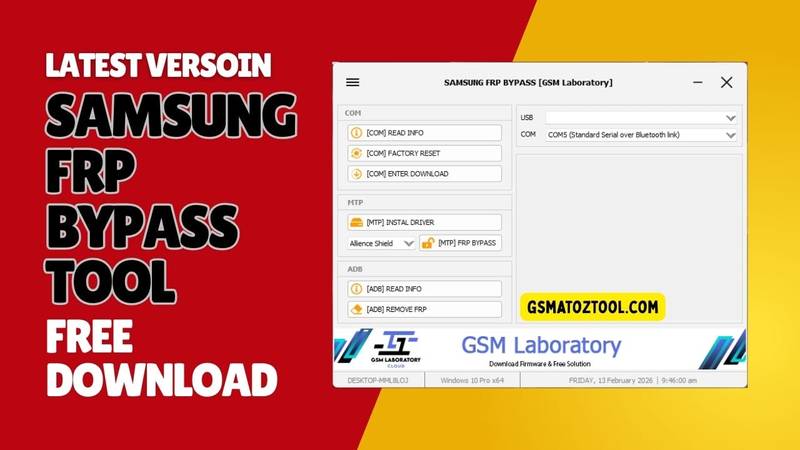
Samsung frp bypass tool helps users remove frp (factory reset protection) and google account lock from samsung galaxy devices easily.
You’re Probably Here Because Another Samsung Phone Is Stuck On Google Lock And Nothing Seems To Work. One Tutorial Says Hit Read Info Another Tells You To Try Factory Reset Or Enter Download Mode And You’re Still Staring At The Same Frp Screen. It’s Frustrating Especially When You Just Want One Samsung Frp Bypass Tool That Actually Does The Job Without Wasting Your Whole Day.
In This Blog I’ll Break Down A Simple Real-world Workflow Using Options Like Install Driver Alliance Shield Option Frp Bypass Read Info And Remove Frp. You’ll See What Each Feature Does When To Use It And How To Move Step By Step From Detection To A Clean Unlocked Device. By The End You’ll Have A Clear Method You Can Follow Instead Of Jumping Blindly Between Random Tricks.
What Is The Samsung Frp Bypass Tool
At Its Core Samsung Frp Bypass Tool Is A Windows Utility That Organizes The Most Common Samsung Service Actions Into A Single Interface. The Software Is Split Into Three Main Mtp Features And Adb So You Always Know Where To Start Based On The Connection Mode You Have. This Setup Makes It Much Easier To Decide Whether You Should First Read Info Try A Factory Reset Or Jump Straight Into Frp Removal.
Com Features Are Designed For Devices Detected On A And Include Options Read Info Factory Reset And Enter Download Mode. Mtp Features Handle Phones That Show Up As Media Devices And Give You Tools Like Install Driver Alliance Shield Option And Frp Bypass For Lighter Frp Work. Finally Adb Features Such As Read Info And Remove Frp Let You Work With Devices That Allow Debugging So You Can Check Details And Clear Frp Directly Over Adb When It’s Enabled.
Also Read
Samsung Frp Bypass Tool Latest Versoin Free Download
To Get The Samsung Frp Bypass Tools Latest Versoin Safely You Should Always Download It From Trusted Gsm Forums Or Well-known Repair Websites. New Releases Often Improve Success Rates For Frp Bypass Make Remove Frp More Stable On Newer Android Versions And Refine Com Operations So Fewer Devices Fail Mid-process. Avoid Random File-sharing Links Because A Free Tool From The Wrong Place Can Easily Bring Malware Onto Your Work Pc.
Once Downloaded Extract The Archive To A Dedicated Tools Folder And Run The Main Program As Administrator. Use Install Driver If Your System Doesn’t Already Have Proper Samsung Drivers Then Quickly Test Read Info And Read Info On A Sample Device To Confirm That Every Connection Mode Works. After This Quick Setup You’ll Be Ready To Use The Full Mix Of Com Mtp And Adb To Reset Enter Download Mode Or Remove Frp On Real Customer Phones With Far More Confidence.
Features
COM
- Read Info
- Factory Reset
- Enter Download Mode
MTP
- Install Driver
- Alliance Shield Option
- FRP Bypass
ADB
- Read Info
- Remove FRP
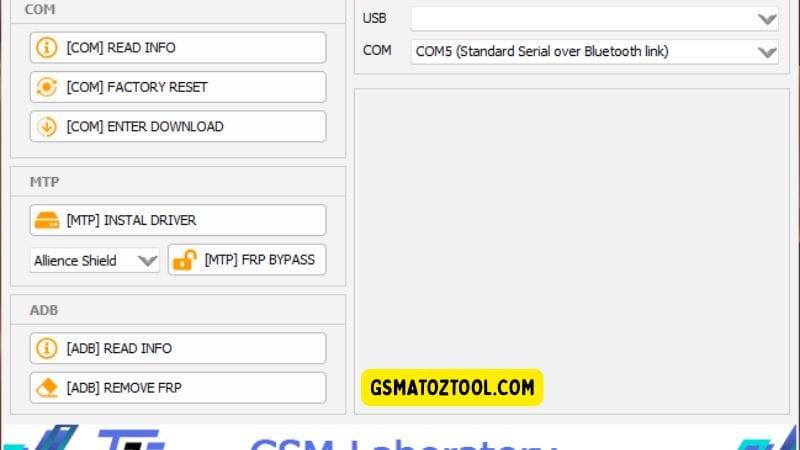
Samsung frp bypass tool by gsm laboratory with com mtp and adb modes for removing google frp lock on samsung devices.
Best Practices Before Using Samsung Frp Bypass Tools
Before You Run Any Operation Make Sure Your Drivers Are Installed Correctly And Your Usb Cable Is Stable. Always Start With Safer Options Like Reading Info And Basic Checks Before You Try Factory Reset Or Frp Removal On A Customer Device. It’s Also Smart To Back Up Whatever Data You Can And Explain To The Owner That Frp Work Can Sometimes Erase Everything On The Phone.
Frequently Asked Questions (FAQs)
What Is A Samsung Frp Bypass Tool Used For?
A Samsung Frp Bypass Tool Is Used To Remove Google Account (frp) Lock From Samsung Devices Using Functions Like Read Info Frp Bypass And Remove Frp.
Do I Need To Use Install Driver Before Running Any Functions?
Yes You Should Always Run Install Driver First So The Phone Is Detected Correctly In Different Modes Like Normal Download Or Adb.
When Should I Use Factory Reset Instead Of Remove Frp?
Use Factory Reset When The Device Is Laggy Full Of Data Or You Want A Fresh Start; Use Remove Frp When Your Main Goal Is Only To Clear The Google Lock.
What Does The Alliance Shield Option Help With?
The Alliance Shield Option Usually Helps You Install And Use The Alliance Shield App Which Can Open Settings And Paths Needed To Finish The Frp Bypass.
Is Enter Download Mode Required For Every Frp Bypass?
No Enter Download Mode Is Mainly Needed When You Plan To Flash Firmware Or Use Other Flashing Tools; Many Frp Bypass Methods Work Without It.
Conclusion
A Good Samsung Frp Bypass Tool Doesn’t Just Throw Random Buttons At You; It Gives You A Clear Path From Connection To Unlock. With Practical Options Like Read Info Factory Reset Enter Download Mode Install Driver Alliance Shield Option Frp Bypass And Remove Frp You Can Choose The Safest Method For Each Device Instead Of Guessing.
If You Follow Each Step Carefully Keep Your Drivers Clean And Only Work On Phones You’re Allowed To Service This Kind Of Tool Can Turn Frp Work From A Headache Into A Simple Routine. Over Time You’ll Build Your Own Proven Workflow And Handle Even Tricky Samsung Locks With Calm Confidence.
How To Download
To Download SamsungFRPTool Follow These Steps:
- Go To The Gsmatoztool.com Website Of Samsung FRP Tool.
- Find The Download Page And Click On The (Download Link).
- Below Buttons Are Advertisements. Please Use The Download Links Above.
- Wait For The Download To Complete.
- Locate The Downloaded File On Your Device Once The Download Is Finished.
- Double-click On The File To Start The Installation Process.
Samsung Frp Bypass Tool
Download Link:: Usersdrive – Mediafire – 4shared – My.pcloud – DropBox – Mega – Vexfile – Google Drive